
MB-330 · Question #43
Drag and Drop Question You are the sales manager at a distribution company. You have a drop-ship order for a batch of chemicals that will go directly from your vendor to your customer. You need to…
Direct Delivery (Drop-Ship) in D365 F&O - Explained --- The Core Concept In D365 F&O, a direct delivery means goods flow from vendor → customer, bypassing your warehouse. Critically, the process is sales-order driven - the system creates the purchase order automatically from…
Question
Exhibit
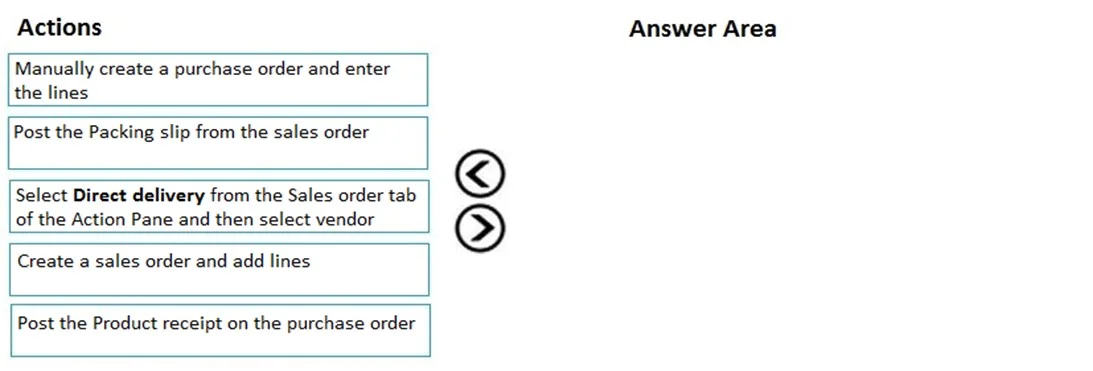
Options
- Box1Create a sales order and add lines
- Box2Select Direct delivery from the Sales order tab of the Action Pane and then select vendor
- Box3Post the Product receipt on the purchase order
Explanation
Direct Delivery (Drop-Ship) in D365 F&O - Explained
The Core Concept
In D365 F&O, a direct delivery means goods flow from vendor → customer, bypassing your warehouse. Critically, the process is sales-order driven - the system creates the purchase order automatically from the sales order, not the other way around.
Step-by-Step Breakdown
Box 1: Create a sales order and add lines
This must come first because the entire direct delivery process is initiated from within the sales order. The customer demand is the trigger. You need order lines in place so D365 knows what items, quantities, and delivery address to pass to the vendor's purchase order. There is nothing to act on without this foundation.
Box 2: Select Direct delivery from the Sales order tab → select vendor
Once the sales order lines exist, you trigger the direct delivery function from the Action Pane → Sales order tab → Direct delivery. This single action does several things automatically:
- Creates a linked purchase order behind the scenes
- Marks both orders as a direct delivery pair
- Copies the customer's delivery address onto the PO (so the vendor ships to the customer, not your warehouse)
- Prompts you to select/confirm the vendor
This cannot happen before Box 1 because there are no lines to link. It must happen before Box 3 because the PO doesn't exist yet.
Box 3: Post the Product receipt on the purchase order
After the vendor ships to the customer, you post the product receipt on the purchase order (not a packing slip on the sales order). This step:
- Confirms the physical delivery occurred
- Updates inventory transactions in transit
- Automatically updates the linked sales order's delivered quantity, enabling customer invoicing
This is the last step because it requires the PO to already exist (created in Box 2) and represents the physical/logical completion of the delivery event.
Common Mistakes & Misconceptions
| Misconception | Reality |
|---|---|
| "I need to manually create the PO first" | The Direct Delivery function creates the PO automatically from the SO |
| "Post a packing slip on the sales order" | In direct delivery, the PO product receipt fulfills this role - no SO packing slip is posted |
| "Invoicing is the final step here" | The question covers delivery processing only; invoicing is a subsequent step |
| "The vendor selection happens at SO creation" | Vendor is selected during the Direct Delivery action (Box 2), not at SO creation |
Mental Model
Sales Order (Box 1)
    └─► Direct Delivery action creates PO + links it (Box 2)
            └─► Vendor ships to customer → Post PO Product Receipt (Box 3)
                    └─► Sales order is now deliverable → Invoice customer (out of scope)
The sequence is strictly linear because each step creates the prerequisite for the next.
Topics
Community Discussion
No community discussion yet for this question.