
MB-330 · Question #42
Drag and Drop Question A company uses Dynamics 365 for Finance and Operations. You need to perform month-end close processes. At which process steps should you perform the actions? To answer, drag…
The correct answer is pre-closing; close procedure - check open quantities; close procedure - check item costs; close procedure - close inventory; inventory close log. D365 F&O Month-End Inventory Close: Process Order Explained Overview These five items represent the sequential phases of the inventory close workflow in D365 F&O. The order is not arbitrary - each step creates a dependency for the next. Performing them out of order causes…
Question
Exhibit
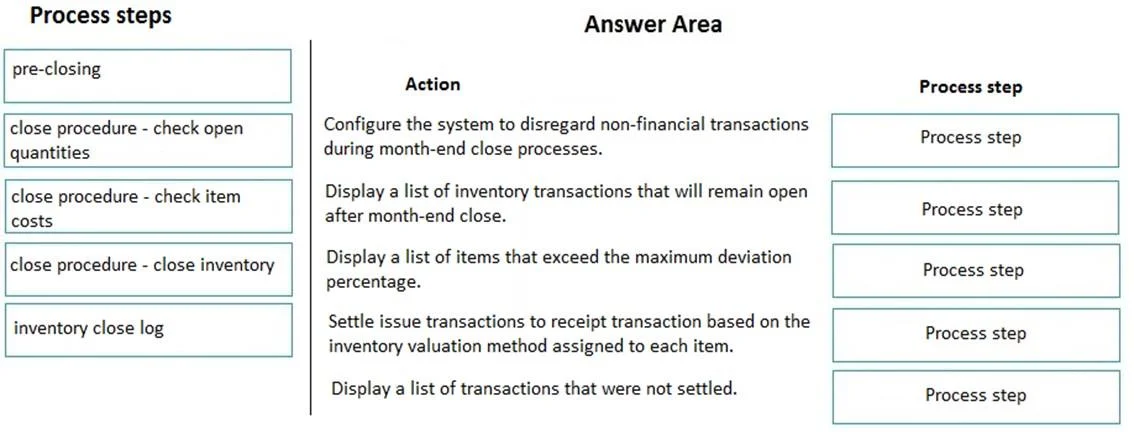
Answer Area
Drag items
Correct arrangement
- pre-closing
- close procedure - check open quantities
- close procedure - check item costs
- close procedure - close inventory
- inventory close log
Explanation
D365 F&O Month-End Inventory Close: Process Order Explained
Overview
These five items represent the sequential phases of the inventory close workflow in D365 F&O. The order is not arbitrary - each step creates a dependency for the next. Performing them out of order causes errors, incorrect cost settlements, or a failed close.
Step-by-Step Breakdown
1. Pre-Closing
Why first: This is the preparation phase. You run inventory recalculation here, which estimates and adjusts running average costs without locking the period. It surfaces cost discrepancies and open transactions before you commit to the close.
- Recalculation is reversible; the actual close is not
- Lets you identify issues while transactions can still be edited
- Common mistake: Skipping this and going straight to the close procedure - you then discover problems mid-close with no easy way to back out
2. Close Procedure - Check Open Quantities
Why second: Before touching costs, you must verify there are no unresolved open inventory transactions (e.g., partially received POs, unposted journals). Open quantities prevent the close engine from fully settling transactions.
- D365 will warn or block the close if open transactions exist
- Common mistake: Assuming posted = closed; transactions can be posted but still "open" in the settlement sense
3. Close Procedure - Check Item Costs
Why third: Once quantities are confirmed clean, verify that item cost configurations (standard cost, costing version activations, pending costs) are correct. The close will use whatever cost is active at close time.
- A misconfigured standard cost here causes incorrect adjustments across all transactions for the period
- Common mistake: Activating a new standard cost after the close has run, requiring a reopen and re-close
4. Close Procedure - Close Inventory
Why fourth: This is the actual inventory close - it settles all inventory transactions (issues against receipts), calculates final FIFO/LIFO/weighted average adjustments, and locks the period from further posting.
- Irreversible without explicitly canceling/reopening the close (which requires reversing all downstream postings)
- All prior steps exist solely to make this step succeed cleanly
5. Inventory Close Log
Why last: After the close completes, you review the close log to confirm all transactions settled correctly, identify any warnings, and document the close for audit purposes.
- This is a post-close verification step, not an action that influences the close
- Common mistake: Treating the log as optional - it's the primary audit trail and the first place to look when downstream GL reconciliation fails
Key Principle
The order follows a reduce risk → verify prerequisites → execute → confirm pattern. Steps 1–3 are all about ensuring the close (step 4) has no surprises. Step 5 confirms it went as expected. Swapping any of steps 1–3 wastes time at best, corrupts costs at worst.
Topics
Community Discussion
No community discussion yet for this question.