
MB-330 · Question #37
Drag and Drop Question You are the product manager at a distribution company. You are responsible for managing product compliance standards and reporting. Chemical product, C0001 can be sold in all…
Explanation: Setting Up Product Compliance for C0001 (Banned in California Only) This question is based on Microsoft Dynamics 365 Supply Chain Management compliance configuration. The scenario requires blocking C0001 from sale in California while allowing it everywhere else in…
Question
Exhibit
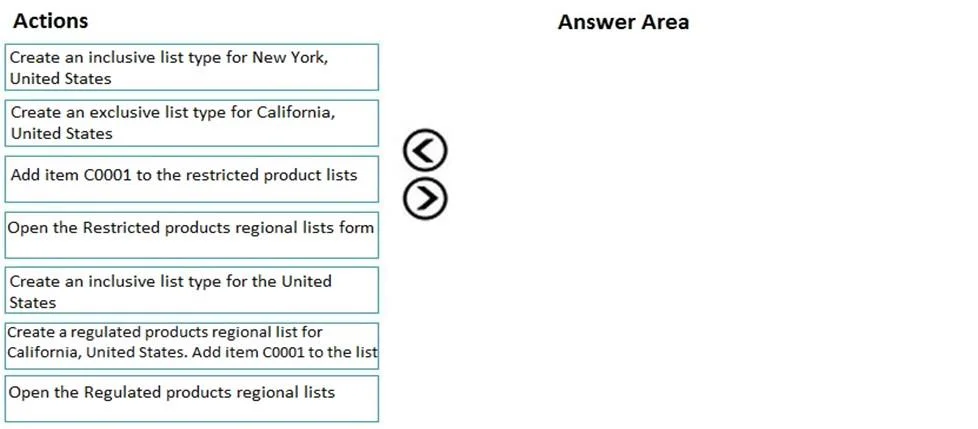
Options
- Option1Create an inclusive list type for New York, United States
- Option2Create an inclusive list type for California, United States
- Option3Add item C0001 to the restricted product lists
- Option4Open the Restricted products regional lists form
- Option5Create an inclusive list type for the United States
- Option6Create a regulated products regional list for California, United States. Add item C0001 to the list
- Option7Open the Regulated products regional lists
Explanation
Explanation: Setting Up Product Compliance for C0001 (Banned in California Only)
This question is based on Microsoft Dynamics 365 Supply Chain Management compliance configuration. The scenario requires blocking C0001 from sale in California while allowing it everywhere else in the US.
The Correct 4-Step Sequence
| Step | Action | Option |
|---|---|---|
| 1 | Open the Restricted products regional lists form | Option4 |
| 2 | Create an inclusive list type for the United States | Option5 |
| 3 | Create an inclusive list type for California, United States | Option2 |
| 4 | Add item C0001 to the restricted product lists | Option3 |
Why Each Step Goes in This Position
Step 1 - Open the Restricted products regional lists form (Option4) You must navigate to the correct form before any configuration is possible. This is always the entry point. Using the Restricted products form (not Regulated) is correct because the product has a geographic sales restriction, not a regulatory compliance designation.
Step 2 - Create an inclusive list type for the United States (Option5) D365 regional lists are hierarchical: a state-level list requires a parent country-level list to exist first. You create the United States parent list before you can create a California sub-list under it. "Inclusive" means items placed on the list are actively restricted (as opposed to an exclusive/allowlist model).
Step 3 - Create an inclusive list type for California, United States (Option2) With the US parent list in place, you now create a California-specific child list. This is the geographic scope of the actual restriction - only California needs to be targeted.
Step 4 - Add item C0001 to the restricted product lists (Option3) Only after the list hierarchy exists do you associate the product. Adding C0001 to the California inclusive list flags it as restricted for sale in that state.
Why the Other Options Are Distractors
| Option | Why It's Wrong |
|---|---|
| Option7 - Open the Regulated products regional lists | Wrong form. "Regulated" is a separate compliance feature; "Restricted" is what controls geographic sales blocks. |
| Option6 - Create a regulated products regional list for California | Wrong form type, and it conflates two separate D365 modules. |
| Option1 - Create an inclusive list type for New York | Irrelevant. C0001 is not restricted in New York. |
Common Mistakes
- Confusing Regulated vs. Restricted: "Regulated products" in D365 tracks regulatory compliance (e.g., hazardous material classifications). "Restricted products" controls where a product can be sold. This scenario is about sales geography - always use Restricted.
- Skipping the US parent list: Candidates often try to go straight to creating the California list. D365 requires the country-level list first; skipping Step 2 means Step 3 has no valid parent.
- Adding the item before creating the list: You cannot associate C0001 until the California list exists. Step 4 must always be last.
- Choosing New York: Option1 is a deliberate distractor - there is no business reason to create a New York list in this scenario.
Topics
Community Discussion
No community discussion yet for this question.