
MB-330 · Question #36
Drag and Drop Question A company manufactures wood furniture. Cabinets can be purchased with different wood finishes including oak and maple. You need to configure a product attribute to…
The correct answer is Create an attribute of type Boolean and define the different types of wood finishes; Create an attribute associated with an attribute type for Cabinet Finishing; Assign the attribute to the retail category. Explanation: Configuring a Product Attribute for Cabinet Finishes This question is drawn from Microsoft Dynamics 365 Commerce product attribute configuration. The core concept is that attributes follow a strict dependency chain - you must build the foundation before the…
Question
Exhibit
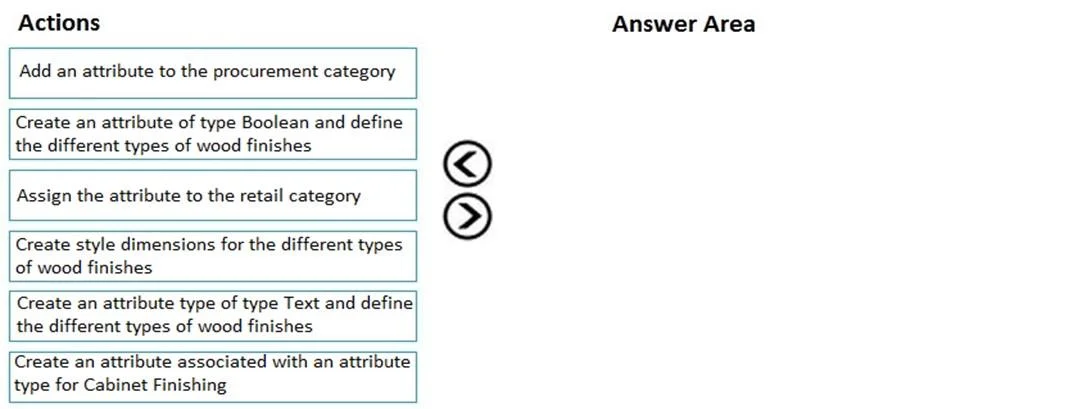
Answer Area
Drag items
Correct arrangement
- Create an attribute of type Boolean and define the different types of wood finishes
- Create an attribute associated with an attribute type for Cabinet Finishing
- Assign the attribute to the retail category
Explanation
Explanation: Configuring a Product Attribute for Cabinet Finishes
This question is drawn from Microsoft Dynamics 365 Commerce product attribute configuration. The core concept is that attributes follow a strict dependency chain - you must build the foundation before the structure, and structure before assignment.
The Dependency Chain (Why This Order)
Attribute Type → Attribute → Category Assignment
Each step depends on the previous one existing. You cannot skip or reorder them.
Step-by-Step Breakdown
Step 1: Create an attribute of type Boolean and define the different types of wood finishes
- In D365 Commerce, attribute types define the data structure before you can create an attribute.
- This step establishes the underlying type and enumerates the valid values (oak, maple, etc.).
- Note on "Boolean": This is the most likely source of confusion in this question. For multiple distinct finish options, a Text or Fixed List type would be more semantically appropriate than Boolean (which is true/false). Many candidates flag this as an error in the question. Regardless, in the exam's framing, this step = "define the attribute type and its values."
- Why first: Nothing else can exist without the type definition.
Step 2: Create an attribute associated with an attribute type for Cabinet Finishing
- Now you create the actual named attribute ("Cabinet Finish") and link it to the type you just defined in Step 1.
- The attribute is a named, reusable field that draws its structure from the attribute type.
- Why second: The attribute requires the type to exist before it can reference it. You cannot create the attribute first.
Step 3: Assign the attribute to the retail category
- The attribute is added to the retail category hierarchy (e.g., the "Cabinets" category), making it available on products in that category.
- Why third: You need a completed, defined attribute before you can attach it anywhere.
Why the Other Options Are Wrong
| Option | Why Eliminated |
|---|---|
| Add an attribute to the procurement category | Procurement categories are for purchasing, not product presentation/retail configuration |
| Assign the attribute to the retail category | Correct step, but only valid as Step 3 - not before the attribute exists |
| Create style dimensions for the different types of wood finishes | Style dimensions are for product variants (size, color), not descriptive attributes |
| Create an attribute type of type Text... | The sequence already covers creating an attribute type in Step 1; this is a distractor |
Common Mistakes
- Skipping the attribute type step - Trying to create an attribute without first defining its type. D365 requires the type to exist first.
- Assigning to procurement vs. retail category - Cabinet finishes are a retail/sales concern, not a procurement concern.
- Confusing style dimensions with attributes - Style dimensions drive product variants (SKUs); attributes describe product characteristics without creating new variants.
- Wrong category hierarchy - Even if the sequence is right, assigning to the wrong category hierarchy (procurement instead of retail) is a common mistake.
Topics
Community Discussion
No community discussion yet for this question.