
MB-330 · Question #46
Drag and Drop Question You are the purchasing manager for a company. You enter into a consignment agreement with a vendor. Raw material R0001 is managed under the consignment agreement with the…
The correct answer is Create a warehouse; Create an aisle; Create a rack; Create a shelf. Explanation: Warehouse Storage Hierarchy for Consignment Inventory This question is from Microsoft Dynamics 365 Supply Chain Management. Despite the consignment scenario in the stem, the answer tests your knowledge of the warehouse storage structure hierarchy required to manage…
Question
Exhibit
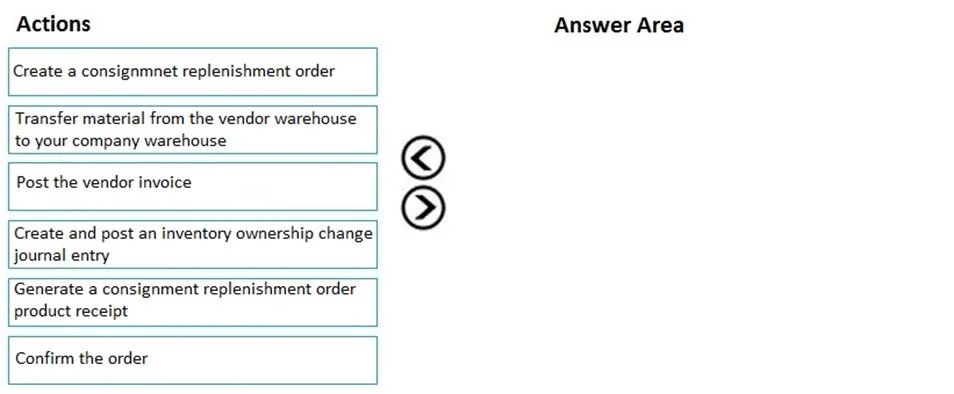
Answer Area
Drag items
Correct arrangement
- Create a warehouse
- Create an aisle
- Create a rack
- Create a shelf
Explanation
Explanation: Warehouse Storage Hierarchy for Consignment Inventory
This question is from Microsoft Dynamics 365 Supply Chain Management. Despite the consignment scenario in the stem, the answer tests your knowledge of the warehouse storage structure hierarchy required to manage consignment inventory locations.
Why These 4 Items?
The full available hierarchy (top to bottom) is:
Site → Warehouse → Aisle → Rack → Shelf → Location
The question excludes Site (assumed to already exist) and Location/Bin (the lowest-level bin, not required for this setup step). The four middle tiers are what you must build to prepare the physical storage structure.
Each Placement Explained
1. Create a Warehouse
The warehouse is the root container for all storage dimensions within a site. You cannot create aisles, racks, or shelves without a warehouse to attach them to. In D365, consignment inventory must be assigned to a specific warehouse - this is the prerequisite for everything else.
2. Create an Aisle
An aisle is a logical corridor within the warehouse. It groups racks together and represents a physical navigation path. It must exist before racks, because racks are children of aisles in the storage dimension hierarchy.
3. Create a Rack
A rack is a physical storage structure placed along an aisle. Racks hold shelves. You must create the rack before the shelf because shelves are attached to racks - not directly to aisles.
4. Create a Shelf
A shelf is the individual storage level on a rack. This is the most granular tier in this sequence and is created last because it depends on the rack (and transitively, the aisle and warehouse) already existing.
Common Mistakes & Misconceptions
| Mistake | Why It's Wrong |
|---|---|
| Including "Create a site" | The site is a prerequisite already assumed to exist in the scenario. Adding it here would make this a 5-step answer. |
| Including "Create a location" | A location (bin) is the most granular tier, below shelf. It's a separate step, not part of the core 4-step structure question. |
| Putting "Create an aisle" before "Create a warehouse" | You cannot attach an aisle to a warehouse that doesn't exist yet. Always top-down. |
| Confusing rack and shelf order | A shelf sits on a rack. Racks come first - it's the parent object. |
| Thinking this is about the consignment process | The question tests warehouse setup, not the consignment replenishment workflow (which would involve purchase orders, ownership journals, etc.). |
Summary
The order strictly follows the parent-child dependency chain of D365's warehouse storage dimensions:
Warehouse → Aisle → Rack → Shelf
You cannot create a child object without its parent existing first. Site is pre-existing; location is out of scope for this 4-step question.
Topics
Community Discussion
No community discussion yet for this question.