
MB-330 · Question #378
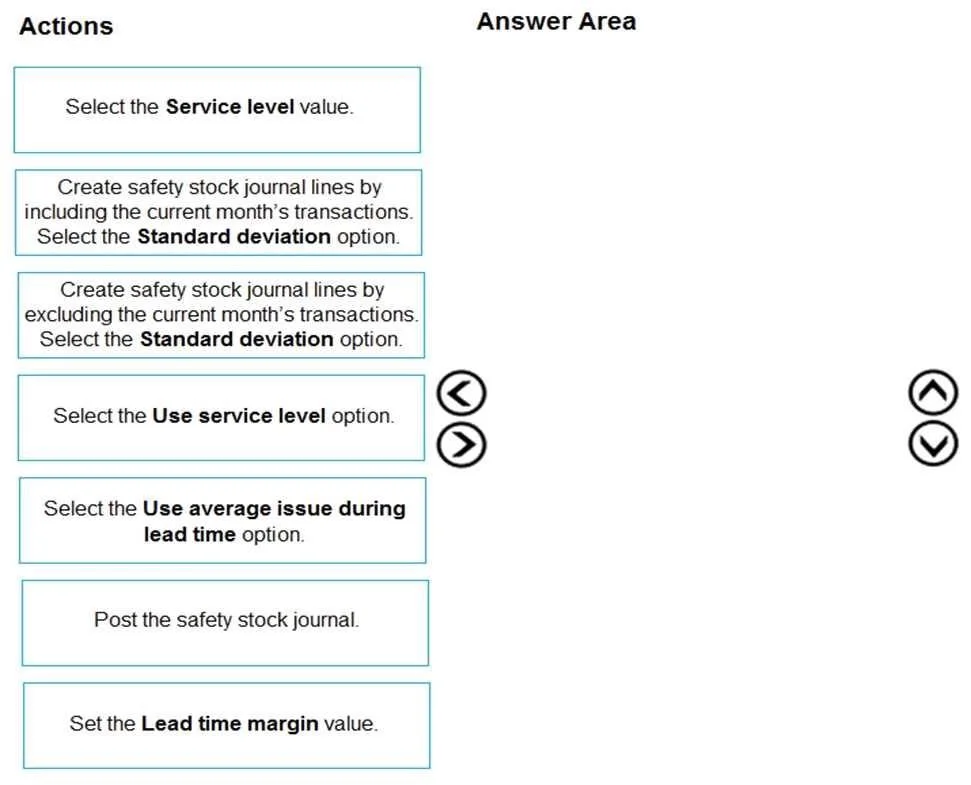
Drag and Drop Question A manufacturing company uses Dynamics 365 Supply Chain Management. You must review the safety stock level for raw materials. You need to calculate the minimum coverage…
The correct answer is Create safety stock journal lines by excluding the current month's transactions. Select the Standard deviation option.; Select the Use service level option.; Post the safety stock journal. Dynamics 365 SCM: Safety Stock Minimum Coverage via Standard Deviation Overview of the Process In D365 Supply Chain Management, safety stock is managed through Safety Stock Journals. The workflow is: create journal lines (with configuration) → configure calculation options →…
Question
Exhibit
Answer Area
Drag items
Correct arrangement
- Create safety stock journal lines by excluding the current month's transactions. Select the Standard deviation option.
- Select the Use service level option.
- Post the safety stock journal.
Explanation
Dynamics 365 SCM: Safety Stock Minimum Coverage via Standard Deviation
Overview of the Process
In D365 Supply Chain Management, safety stock is managed through Safety Stock Journals. The workflow is: create journal lines (with configuration) → configure calculation options → post to apply results. The three steps reflect this exact flow.
Step-by-Step Breakdown
Step 1: Create safety stock journal lines by excluding the current month's transactions. Select the Standard deviation option.
Why this is first: You cannot configure options before the journal lines exist - creation is always the starting point.
Why exclude the current month: Standard deviation is a statistical calculation requiring complete historical data. The current month is in progress and its transactions are incomplete. Including partial data would artificially deflate the standard deviation, producing an understated (and therefore unsafe) safety stock proposal. Excluding it ensures only full, closed periods feed the calculation.
Why Standard deviation (not Average issue): The question explicitly requires minimum coverage proposals based on standard deviation. "Use average issue during lead time" is the alternative method and does not produce a statistically-derived safety stock level.
Step 2: Select the Use service level option.
Why this is second (not first): This option appears within the journal lines after they are created. You are configuring how the standard deviation formula is applied - specifically, instructing the system to use a service level factor (the Z-score) to convert the standard deviation into a safety stock quantity.
The formula is: Safety Stock = Z × σ × √Lead Time
Without enabling "Use service level," the system has no Z-factor to pair with the standard deviation, and the proposal is incomplete.
Common misconception - "Select the Service level value" vs. "Select the Use service level option": These are two distinct actions. "Use service level" is the toggle/checkbox that enables the feature. The "Service level value" is the numeric input (e.g., 95%). On the exam, enabling the option is the required action because it drives the calculation logic; inputting the value is subordinate to it and not listed as a separate required step here.
Step 3: Post the safety stock journal.
Why this is last: Until posted, the calculated quantities are only proposals visible inside the journal. Posting commits them to the item's coverage settings as actual minimum inventory levels that MRP will respect. Reversing this order - posting before configuring standard deviation or service level - would apply incorrect or incomplete values to live data.
Why the Remaining Options Are Wrong
| Option | Why Excluded |
|---|---|
| Include current month's transactions | Incomplete data skews standard deviation downward - statistically unsound |
| Use average issue during lead time | Different calculation method; contradicts the "standard deviation" requirement |
| Set the Lead time margin value | Optional buffer configuration, not required for the core calculation |
| Select the Service level value | A subordinate input within step 2, not a standalone required action in this sequence |
Key Takeaway
The logic is: build the data foundation → configure the statistical method → commit the result. Every distractor either uses the wrong calculation method, corrupts the data sample, or represents an optional sub-step rather than a required action.
Topics
Community Discussion
No community discussion yet for this question.