
Microsoft
MB-330 · Question #375
Drag and Drop Question A company uses Dynamics 365 Supply Chain Management. The company implements master planning. The company identifies several supply chain issues. You need to configure safety…
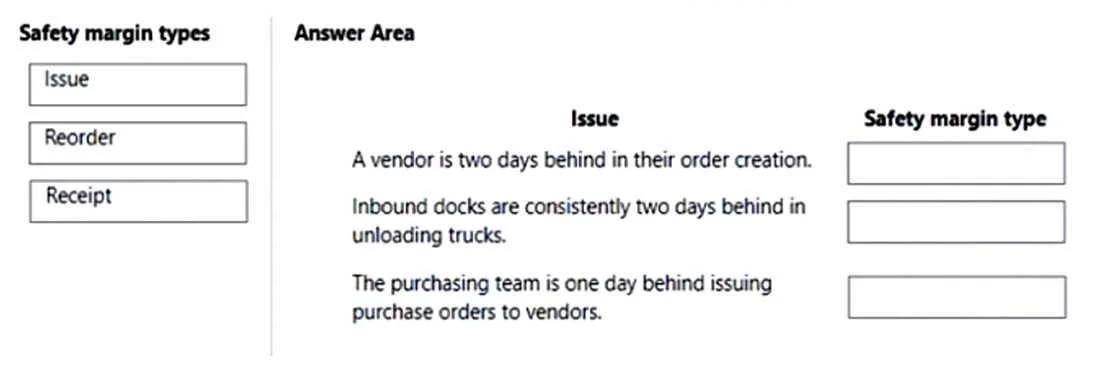
The correct answer is Reorder; Receipt; Issue. Dynamics 365 SCM: Safety Margins in Master Planning Overview of Safety Margins In master planning, safety margins add buffer days to protect against supply chain uncertainties. There are three distinct types, each targeting a different point in the supply/demand timeline…
Implement master planning
Question
Drag and Drop Question A company uses Dynamics 365 Supply Chain Management. The company implements master planning. The company identifies several supply chain issues. You need to configure safety margins for the company. Which type of safety margin should you use? To answer, drag the appropriate safety margin types to the correct issues. Each safety margin type may be used once, more than once, or not at all. You may need to drag the split bar between panes or scroll to view content. NOTE: Each correct selection is worth one point. Answer:
Exhibit
Answer Area
Drag items
ReorderReceiptIssue
Correct arrangement
- Reorder
- Receipt
- Issue
Explanation
Dynamics 365 SCM: Safety Margins in Master Planning
Overview of Safety Margins
In master planning, safety margins add buffer days to protect against supply chain uncertainties. There are three distinct types, each targeting a different point in the supply/demand timeline.
Each Safety Margin Explained
1. Reorder Margin
- What it does: Shifts planned orders earlier than the calculated need date. It adds days before a planned order is triggered.
- Issue it solves: Compensates for variability in vendor lead times - when suppliers don't always deliver on schedule and you need to place orders sooner to avoid shortages.
- Timeline position: Applied at the order placement point (furthest upstream).
2. Receipt Margin
- What it does: Adds buffer days after a planned receipt arrives before it's considered available for use.
- Issue it solves: Covers inbound processing delays - inspection, quality control, putaway, or quarantine after goods physically arrive.
- Timeline position: Applied between receipt date and available-for-use date.
3. Issue Margin
- What it does: Adds buffer days before a demand/requirement date, pulling the effective need date earlier in planning calculations.
- Issue it solves: Covers outbound handling time - picking, packing, staging, or internal transport needed before items are actually consumed or shipped.
- Timeline position: Applied closest to the demand/consumption point (furthest downstream).
Timeline Visualization
[Order Placed] → REORDER MARGIN → [Goods Arrive] → RECEIPT MARGIN → [Available] → ISSUE MARGIN → [Demand Date]
Common Mistakes
| Misconception | Reality |
|---|---|
| Confusing Receipt and Issue margins | Receipt = inbound buffer after arrival; Issue = outbound buffer before consumption |
| Using Reorder margin for receipt delays | Reorder margin doesn't affect receiving - it only moves order triggers earlier |
| Thinking margins are interchangeable | Each targets a specific bottleneck in a different phase of the supply chain |
The key mental model: Reorder protects procurement timing, Receipt protects inbound availability, and Issue protects outbound fulfillment.
Topics
#safety margins#receipt margin#issue margin#reorder margin
Community Discussion
No community discussion yet for this question.