
MB-330 · Question #205
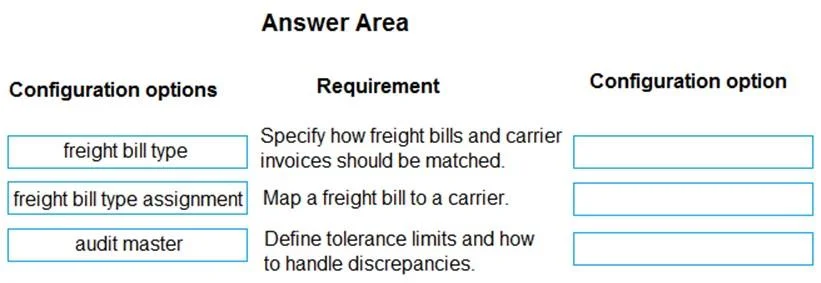
Drag and Drop Question A client uses Dynamics 365 Supply Chain Management. You need to configure automatic freight reconciliation. Which configuration options should you use? To answer, drag the…
The correct answer is freight bill type; freight bill type assignment; audit master. D365 SCM: Automatic Freight Reconciliation Configuration Context In D365 Supply Chain Management, freight reconciliation matches carrier invoices against expected freight charges. Automatic reconciliation requires three sequential configuration steps, each building on the…
Question
Exhibit
Answer Area
Drag items
Correct arrangement
- freight bill type
- freight bill type assignment
- audit master
Explanation
D365 SCM: Automatic Freight Reconciliation Configuration
Context
In D365 Supply Chain Management, freight reconciliation matches carrier invoices against expected freight charges. Automatic reconciliation requires three sequential configuration steps, each building on the previous.
Item-by-Item Explanation
1. Freight Bill Type → Requirement 1 (Define the freight bill structure)
The freight bill type is the foundational configuration. It defines the layout, fields, and format of freight bills you expect to receive from carriers. You cannot configure anything downstream without first defining what a freight bill looks like. This lives under:
Transportation management > Setup > Freight reconciliation > Freight bill types
Common mistake: Skipping this and trying to assign types to carriers before defining them - the assignment form won't have anything to reference.
2. Freight Bill Type Assignment → Requirement 2 (Link freight bill types to carriers)
Once the type is defined, you assign it to specific shipping carriers. This tells the system: "When this carrier sends a freight bill, use this structure to interpret it." Without this linkage, the system cannot automatically match incoming bills to the correct format.
Common mistake: Assuming the freight bill type automatically applies to all carriers. It must be explicitly assigned per carrier.
3. Audit Master → Requirement 3 (Enable automatic reconciliation rules)
The audit master is what actually drives the automatic reconciliation process. It defines:
- Matching criteria (tolerances, thresholds)
- Whether reconciliation is automatic or manual
- Which freight bill types are in scope
This is configured last because it depends on both the bill type and the assignment being in place.
Common mistake: Treating the audit master as optional - without it, the system cannot perform automatic reconciliation, only manual.
Configuration Dependency Chain
Freight bill type → Freight bill type assignment → Audit master
   (define)               (assign to carrier)        (auto-match rules)
Each step has a hard dependency on the previous one - this is why the order is fixed.
Topics
Community Discussion
No community discussion yet for this question.