
MB-330 · Question #187
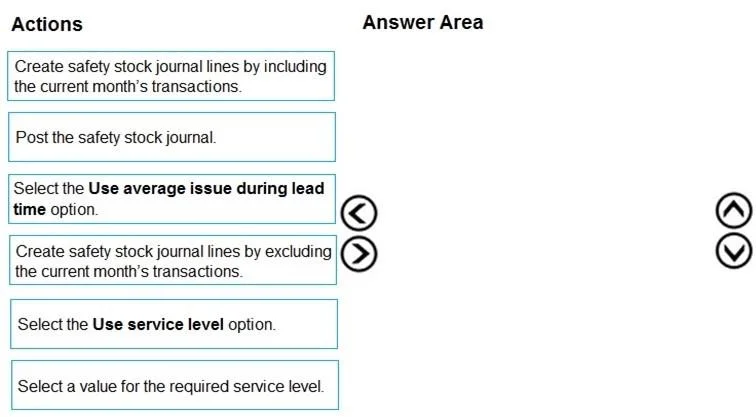
Drag and Drop Question A manufacturing company uses Dynamics 365 Supply Chain Management. You must update the safety stock level for raw materials. You need to calculate and process minimum coverage…
The correct answer is Create safety stock journal lines by including the current month's transactions.; Select the Use average issue during lead time option.; Post the safety stock journal. D365 SCM: Safety Stock Journal - Minimum Coverage Proposals Overview of the Process In D365 Supply Chain Management, safety stock journals let you propose and apply new minimum coverage quantities to items. The workflow is: build the journal lines (with the right data scope) →…
Question
Exhibit
Answer Area
Drag items
Correct arrangement
- Create safety stock journal lines by including the current month's transactions.
- Select the Use average issue during lead time option.
- Post the safety stock journal.
Explanation
D365 SCM: Safety Stock Journal - Minimum Coverage Proposals
Overview of the Process
In D365 Supply Chain Management, safety stock journals let you propose and apply new minimum coverage quantities to items. The workflow is: build the journal lines (with the right data scope) → configure the calculation method → post to commit the changes.
Step-by-Step Breakdown
Step 1: Create safety stock journal lines by including the current month's transactions
This generates the journal and pulls historical transaction data into it. You choose including the current month because the question explicitly asks for calculations based on historical transactions - including the current period gives you the most complete, up-to-date dataset for accurate averages. Excluding it would leave a gap in recent history without a justified reason (e.g., an anomalous month you want to filter out).
Common mistake: Assuming you should exclude the current month because it's "not yet complete." Unless you have a specific reason to distrust the current period's data, including it produces more representative results.
Step 2: Select the Use average issue during lead time option
After the lines are created, you configure how the minimum quantity is calculated. "Use average issue during lead time" computes safety stock as the average demand consumed during the replenishment lead time - derived directly from your historical transactions. This matches the question's requirement of using historical data to produce minimum coverage proposals.
Common mistake: Selecting "Use service level" instead. That method uses a statistical/probabilistic model (standard deviation of demand) and requires you to also enter a target service level percentage - it does not simply average historical issues. The two "Select a value for the required service level" and "Use service level" options form a pair that is entirely irrelevant to the average-issue method.
Step 3: Post the safety stock journal
Posting commits the proposed minimum quantities to the item coverage records. Until you post, the calculations exist only as proposals in the journal - nothing in the system actually changes. This step is always last.
Common mistake: Thinking the journal lines are "applied" as soon as they're created. Creation and posting are separate actions; the journal must be explicitly posted.
Why the Discarded Options Are Wrong
| Option | Why excluded |
|---|---|
| Exclude current month | No justification given; loses recent data |
| Use service level | Different statistical method; not transaction-average-based |
| Select a value for required service level | Only relevant when using the service level method |
The three correct steps form a tight logical chain: scope the data → set the calculation method → apply the result.
Topics
Community Discussion
No community discussion yet for this question.