
MB-330 · Question #150
Drag and Drop Question A client uses Dynamics 365 Supply Chain Management to manage prospects and the sales cycle. A sales representative needs to create a sales quotation for a current prospect and…
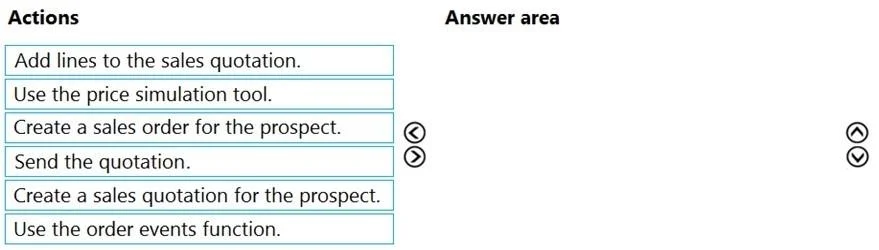
The correct answer is Create a sales quotation for the prospect.; Add lines to the sales quotation.; Use the price simulation tool.; Send the quotation. Dynamics 365 SCM: Sales Quotation with Margin Validation The Correct Sequence & Why --- 1. Create a sales quotation for the prospect You must create the quotation document first - it's the container for everything that follows. In D365 SCM, a sales quotation is a distinct…
Question
Exhibit
Answer Area
Drag items
Correct arrangement
- Create a sales quotation for the prospect.
- Add lines to the sales quotation.
- Use the price simulation tool.
- Send the quotation.
Explanation
Dynamics 365 SCM: Sales Quotation with Margin Validation
The Correct Sequence & Why
1. Create a sales quotation for the prospect
You must create the quotation document first - it's the container for everything that follows. In D365 SCM, a sales quotation is a distinct record type separate from a sales order. Since this is a prospect (not yet a customer), the quotation is initiated from the Sales and Marketing module under Quotations > All quotations, selecting "Prospect" as the account type. Nothing else can happen until this header record exists.
2. Add lines to the sales quotation
Once the quotation header is created, you populate it with the items being quoted (products, quantities, prices). Margin calculations are line-dependent - D365 computes margin per line based on unit cost vs. unit price. You cannot simulate pricing or validate margins without line items present.
3. Use the price simulation tool
The Price simulation function (found on the quotation's Quotation tab in the ribbon) lets you model different pricing scenarios and immediately see the resulting margin percentage. This is the specific feature designed for validating margin thresholds. You can adjust discounts or prices and see in real time whether the 40% margin requirement is met before committing. This step directly addresses the business requirement in the question.
4. Send the quotation
Once lines are verified and margin requirements are confirmed, you use Send quotation to transmit it to the prospect. This action changes the quotation status and generates the formal output (email/print). Sending before margin validation would risk committing to unprofitable pricing.
Why the Distractors Are Wrong
| Item | Why Excluded |
|---|---|
| Create a sales order for the prospect | A sales order is created after the prospect accepts the quotation (by confirming it). Creating an order at this stage skips the quotation process entirely - and prospects aren't yet customers, so this is premature. |
| Use the order events function | Order events is a tracking/audit feature for monitoring what has happened on an order. It has no role in margin validation or quotation creation. |
Common Mistakes
- Confusing price simulation with sales order creation: Candidates often place "Create a sales order" in the sequence, misreading the workflow. The quotation lifecycle in D365 is: Quotation → Confirm → Sales Order. The order comes after prospect acceptance.
- Skipping the price simulation step: Some assume margin validation is done manually by eyeballing the line totals. The question specifically tests knowledge that D365 has a dedicated price simulation tool for this purpose.
- Sending before simulating: The business rule (40% margin) must be validated before the quotation leaves the building - reversing steps 3 and 4 is a logical error that the question is designed to catch.
Topics
Community Discussion
No community discussion yet for this question.