
MB-330 · Question #148
Drag and Drop Question You are implementing Dynamics 365 Supply Chain Management. A user reports that some of the quarantine statuses appear to mean the same thing. You need to explain the status of…
The correct answer is Started; Reported as finished; Ended. Dynamics 365 SCM: Quarantine Order Statuses by Item Location The Core Concept Quarantine orders track where an item physically is during the inspection/hold process. The question asks specifically about location-based statuses - meaning which statuses correspond to a distinct…
Question
Exhibit
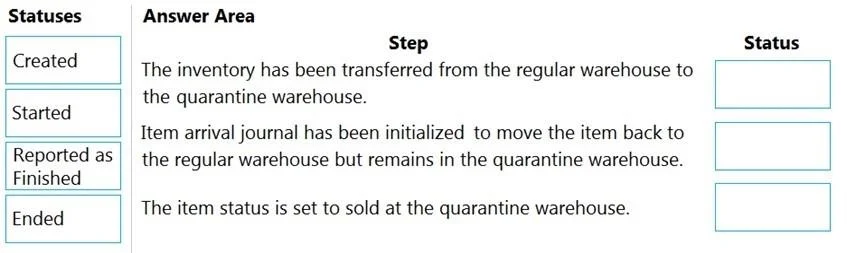
Answer Area
Drag items
Correct arrangement
- Started
- Reported as finished
- Ended
Explanation
Dynamics 365 SCM: Quarantine Order Statuses by Item Location
The Core Concept
Quarantine orders track where an item physically is during the inspection/hold process. The question asks specifically about location-based statuses - meaning which statuses correspond to a distinct physical location of the item. Three statuses qualify; one does not.
Why "Created" Is Excluded
Created is not in the correct arrangement because it does not represent a location change. When a quarantine order is created, the item is still sitting at its original location (e.g., receiving dock, inbound shipment area). No physical movement has occurred, so it cannot map to a location-based step.
Common mistake: Students assume all 4 statuses belong and add "Created" as Step 1. The question asks specifically about location of the item - "Created" has no associated location change.
The Three Correct Steps
Step 1 - Started
The item has been physically moved to the quarantine warehouse/zone. This is the first status that reflects an actual location change. The quarantine process is actively underway and the item is isolated in the quarantine location.
Step 2 - Reported as Finished
The quarantine inspection/work is complete. The item has been moved to an output or staging location - it is no longer in the active quarantine zone but has not yet been returned to general inventory. This is an intermediate location state.
Common mistake: Confusing this with "Ended." "Reported as finished" means the work is done but the item is still in transition - not yet back in the main warehouse.
Step 3 - Ended
The quarantine order is closed. The item has been returned to the main warehouse/inventory location (or scrapped/adjusted per the inspection outcome). This is the final location state - quarantine is fully resolved.
Summary Table
| Status | Item Location |
|---|---|
| Original location - no movement | |
| Started | Quarantine warehouse/zone |
| Reported as finished | Output/staging location |
| Ended | Main warehouse (returned to inventory) |
Key Takeaway
The sequence tracks a physical journey: quarantine zone → output staging → back to inventory. "Created" is excluded because it precedes any movement and therefore has no distinct location to map to.
Topics
Community Discussion
No community discussion yet for this question.