
MB-310 · Question #429
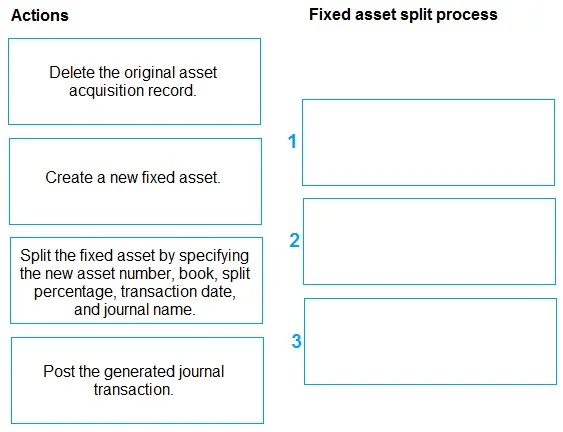
Drag and Drop Question A company uses Dynamics 365 Finance to manage fixed assets. The company requires partial retirement of a fixed asset by using the split fixed asset functionality. You need to…
The correct answer is Split the fixed asset by specifying the new asset number, book, split percentage, transaction date, and journal name.; Post the generated journal transaction.; Delete the original asset acquisition record. Fixed Asset Split in Dynamics 365 Finance - Explanation What the question is testing Your understanding of the Split Fixed Asset workflow, which allows partial retirement by transferring a portion of an asset's value to a new asset record. --- Why the correct order is what it…
Question
Exhibit
Answer Area
Drag items
Correct arrangement
- Split the fixed asset by specifying the new asset number, book, split percentage, transaction date, and journal name.
- Post the generated journal transaction.
- Delete the original asset acquisition record.
Explanation
Fixed Asset Split in Dynamics 365 Finance - Explanation
What the question is testing
Your understanding of the Split Fixed Asset workflow, which allows partial retirement by transferring a portion of an asset's value to a new asset record.
Why the correct order is what it is
Step 1: Split the fixed asset by specifying the new asset number, book, split percentage, transaction date, and journal name.
This must come first because it is the initiating action - Dynamics 365 generates the split journal automatically based on the parameters you provide. You cannot post or clean up anything until this journal exists. The system calculates the proportional value to transfer using the split percentage and prepares the transaction entries for both the original and new asset.
Misconception: Some assume you must manually create the new fixed asset record first. You do not - the split function handles that based on the asset number you specify in the dialog.
Step 2: Post the generated journal transaction.
After the split is configured, the system creates a journal but does not post it automatically. You must explicitly post it to move value from the original asset to the new one. Until posted, no ledger entries exist and no balances are transferred.
Misconception: Some assume "Create a new fixed asset" belongs here or earlier. In the split workflow, the new asset is already referenced in Step 1 and populated by the posting - you do not separately create it mid-process.
Step 3: Delete the original asset acquisition record.
After posting, the original asset may still carry its full original acquisition transaction in the book, which would cause a double-count. Deleting the original acquisition record corrects the book balance so it reflects only the remaining (post-split) value. This is a cleanup step and can only logically follow a successful post.
Common mistake: Candidates either omit this step entirely or try to place it before posting. It must come last - you need the posted split to have occurred before the original acquisition record is reconciled/removed.
Why "Create a new fixed asset" is the distractor
This item is intentionally misleading. While Dynamics 365 does create a new asset as part of the split, it is handled internally by the split function in Step 1, not as a separate manual prerequisite. Selecting this as one of the three actions and inserting it into the sequence is the most common error.
Topics
Community Discussion
No community discussion yet for this question.