
MB-310 · Question #385
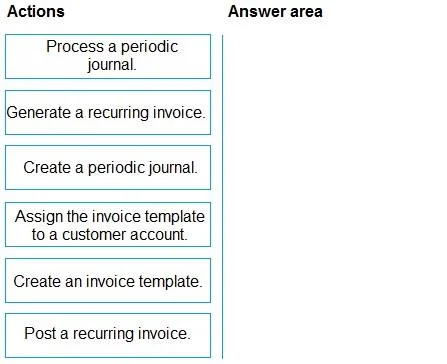
Drag and Drop Question You are configuring Dynamics 365 Finance. You need to configure the system to generate recurring service invoices to customers. Which four actions should you perform in…
The correct answer is Create an invoice template.; Assign the invoice template to a customer account.; Generate a recurring invoice.; Post a recurring invoice. Dynamics 365 Finance: Recurring Service Invoices - Sequence Explained The correct workflow follows a logical setup → link → execute → finalize pattern. Here's why each step lands where it does. --- Step 1: Create an invoice template Why first: A template is the foundation. It…
Question
Exhibit
Answer Area
Drag items
Correct arrangement
- Create an invoice template.
- Assign the invoice template to a customer account.
- Generate a recurring invoice.
- Post a recurring invoice.
Explanation
Dynamics 365 Finance: Recurring Service Invoices - Sequence Explained
The correct workflow follows a logical setup → link → execute → finalize pattern. Here's why each step lands where it does.
Step 1: Create an invoice template
Why first: A template is the foundation. It defines the recurring invoice lines - items, amounts, frequencies, and dates. Nothing else can happen until this master definition exists. You cannot assign something that doesn't exist yet.
Step 2: Assign the invoice template to a customer account
Why second: Once the template exists, you link it to one or more customer accounts. This tells the system who gets billed and which template applies to them. This is a configuration step - it doesn't generate any document yet, it just establishes the relationship.
Step 3: Generate a recurring invoice
Why third: This action uses the template-customer assignment to actually create the invoice documents in the system. It pulls the recurring schedule and produces invoices ready for review. The invoice exists but is not yet posted (i.e., it has no financial impact yet).
Step 4: Post a recurring invoice
Why last: Posting is always the final step - it commits the invoice to the ledger, updates customer balances, and makes it legally/financially binding. You cannot post before generating, because there's nothing to post.
The Two Distractors
| Item | Why it's excluded |
|---|---|
| Create a periodic journal | This belongs to the general ledger periodic journal workflow, not the free text/recurring invoice workflow. Different feature entirely. |
| Process a periodic journal | Same reason - periodic journals are for recurring GL entries (accruals, allocations), not customer invoicing. |
Common Mistakes
- Confusing periodic journals with recurring invoices - The two distractor items exist specifically to exploit this confusion. Periodic journals live in General Ledger; recurring invoices live in Accounts Receivable.
- Skipping the assignment step - Candidates sometimes think you can generate directly from a template without linking it to a customer first. The assignment is mandatory.
- Reversing Generate and Post - Generate creates the draft; Post finalizes it. They are never interchangeable.
Topics
Community Discussion
No community discussion yet for this question.