
MB-310 · Question #393
Drag and Drop Question A company plans to set up and use revenue and expense deferrals in subscription billing. The company must be able to do the following: - Set up default accounts and templates…
The correct answer is Deferral templates; All deferral schedules. Explanation: Revenue & Expense Deferrals in Dynamics 365 Subscription Billing This question tests knowledge of the Subscription Billing module in Microsoft Dynamics 365 Finance, specifically the Revenue and Expense Deferrals feature. --- Requirement → Configuration Mapping |…
Question
Exhibit
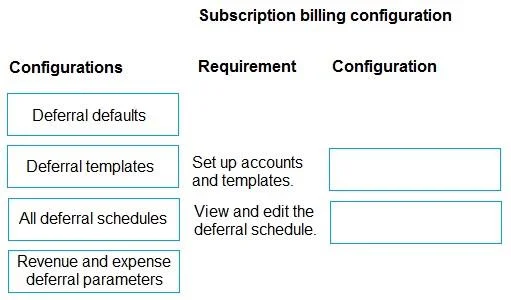
Answer Area
Drag items
Correct arrangement
- Deferral templates
- All deferral schedules
Explanation
Explanation: Revenue & Expense Deferrals in Dynamics 365 Subscription Billing
This question tests knowledge of the Subscription Billing module in Microsoft Dynamics 365 Finance, specifically the Revenue and Expense Deferrals feature.
Requirement → Configuration Mapping
| Requirement | Correct Configuration |
|---|---|
| Set up default accounts and templates for the deferral schedule | Deferral templates |
| View and edit the deferral schedule | All deferral schedules |
Item-by-Item Analysis
Deferral templates → Requirement 1
- This is the setup page where you define the structure of a deferral schedule - including the deferral/recognition accounts, schedule type (straight-line, event-based), and period count.
- Templates are reusable blueprints applied to transactions, so they inherently cover both "default accounts" and "templates" in a single place.
- This is the correct tool for building the framework before any transactions occur.
All deferral schedules → Requirement 2
- This page gives a system-wide list of every generated deferral schedule across all transactions.
- From here, users can open, view, and edit individual schedules (e.g., adjusting recognition dates, amounts, or accounts on existing records).
Why the Wrong Items Are Incorrect
Deferral defaults (not selected for either requirement)
- Handles system-level fallback settings (e.g., what accounts to use if no template is specified).
- It does not define templates themselves - it just fills gaps when templates are absent.
- Common mistake: assuming "defaults" = template setup because of the word "default accounts" in the requirement.
Revenue and expense deferral parameters (not selected for either requirement)
- This is a feature-level configuration page: enabling the feature, setting number sequences, defining posting behavior.
- It does not manage templates or individual schedule records.
- Common mistake: choosing this because it sounds comprehensive/foundational.
Key Takeaway
Deferral templates = how schedules are built (setup/design) All deferral schedules = how schedules are managed (view/edit after creation)
The trap is that "Deferral defaults" sounds relevant to "setting up default accounts," but in Dynamics 365, defaults are fallback values, not template definitions. Templates are the true setup mechanism.
Topics
Community Discussion
No community discussion yet for this question.