
MB-310 · Question #383
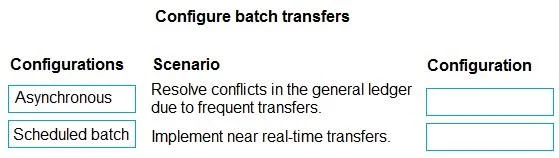
Drag and Drop Question A company uses Dynamics 365 Finance. The company plans to use batch transfers to improve business processes. The company has the following requirements based on different…
The correct answer is Scheduled batch; Asynchronous. Dynamics 365 Finance: Subledger to General Ledger Transfer Modes The Two Transfer Modes Explained Scheduled Batch Transfers are grouped and processed at defined intervals (e.g., hourly, nightly). Processing is serialized and controlled - the system works through a queue in an…
Question
Exhibit
Answer Area
Drag items
Correct arrangement
- Scheduled batch
- Asynchronous
Explanation
Dynamics 365 Finance: Subledger to General Ledger Transfer Modes
The Two Transfer Modes Explained
Scheduled Batch Transfers are grouped and processed at defined intervals (e.g., hourly, nightly). Processing is serialized and controlled - the system works through a queue in an orderly sequence.
Asynchronous Transfers are queued and processed nearly immediately in the background without blocking the user. The system doesn't wait for a schedule; it processes as fast as resources allow.
Why Each Placement is Correct
Scenario 1: Resolve GL conflicts from frequent transfers → Scheduled Batch
Conflicts arise when multiple processes attempt to write to the same general ledger accounts simultaneously. Scheduled batch resolves this by serializing transfers into controlled, timed windows. Instead of many concurrent writes competing against each other, the system processes a consolidated batch at one time, eliminating the contention that causes conflicts.
Scenario 2: Near real-time transfers → Asynchronous
Asynchronous mode queues subledger entries and processes them almost immediately in the background. There's no waiting for a scheduled window - transactions flow to the GL continuously, satisfying the near real-time requirement.
Common Mistakes
| Misconception | Reality |
|---|---|
| "Asynchronous sounds like it would cause conflicts too" | Asynchronous processes one-at-a-time from a queue; it doesn't create simultaneous write collisions the way frequent uncontrolled transfers do |
| "Scheduled batch is slow, so it can't fix anything" | Speed isn't the point - serialization is what resolves conflicts |
| Confusing Asynchronous with Synchronous | Synchronous (not listed here) is fully blocking/immediate; Asynchronous is near-real-time but non-blocking |
The key distinction: Scheduled batch = conflict control via serialization; Asynchronous = speed via background queuing.
Topics
Community Discussion
No community discussion yet for this question.