
MB-310 · Question #314
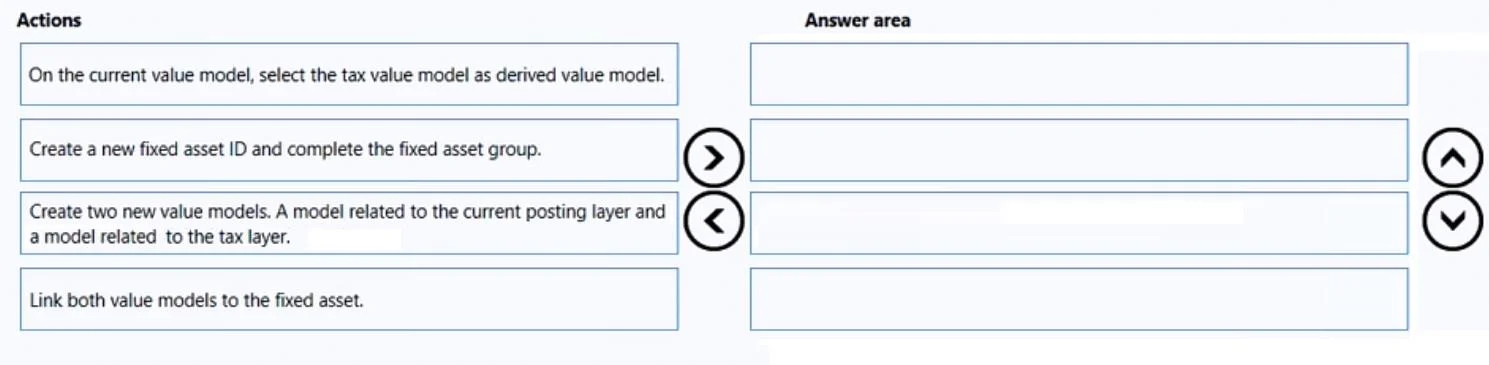
Drag and Drop Question A company uses Microsoft Dynamics 365 Finance. You receive a new purchase invoice. You must process the invoice as a fixed asset that complies with applicable tax regulations…
The correct answer is Create new value models. A model related to the current posting layer and a model related to the tax layer.; On the current value model, select the tax value model as derived value model.; Create a new fixed asset ID and complete the fixed asset group.; Link both value models to the fixed asset. Explanation: Fixed Asset Configuration with Tax Compliance in D365 Finance Background Concepts Two core concepts drive this ordering: Posting layers: D365 Finance maintains separate posting layers - Current (for financial/accounting, e.g., IFRS/GAAP) and Tax (for tax authority…
Question
Exhibit
Answer Area
Drag items
Correct arrangement
- Create new value models. A model related to the current posting layer and a model related to the tax layer.
- On the current value model, select the tax value model as derived value model.
- Create a new fixed asset ID and complete the fixed asset group.
- Link both value models to the fixed asset.
Explanation
Explanation: Fixed Asset Configuration with Tax Compliance in D365 Finance
Background Concepts
Two core concepts drive this ordering:
- Posting layers: D365 Finance maintains separate posting layers - Current (for financial/accounting, e.g., IFRS/GAAP) and Tax (for tax authority reporting). Each requires its own value model (book).
- Derived value model: Because the scenario prohibits double entry for acquisitions, D365 uses a derived book relationship. When you post to the primary (current) book, the system automatically mirrors the transaction to the derived (tax) book - no second manual entry required.
Step-by-Step Reasoning
1. Create new value models - current layer and tax layer
You must build the infrastructure before anything else. Both value models need to exist as independent objects before you can configure any relationship between them or attach them to an asset. This is a prerequisite for every subsequent step. Skipping this or doing it later makes Steps 2 and 4 impossible.
2. On the current value model, select the tax value model as derived value model
With both books now existing, you wire them together. Opening the current value model and pointing to the tax model as derived is what enforces the "no double entry" constraint - D365 will post to the tax layer automatically when the current layer is posted to. This configuration belongs to the book itself, not to any individual asset, so it must be done at the book level before any asset is linked. If you linked books to the asset first and configured this later, the derived relationship might not propagate correctly.
3. Create a new fixed asset ID and complete the fixed asset group
Only now do you create the actual asset record. The fixed asset group carries default settings and determines which books will be associated. You need the books fully configured (Steps 1–2 complete) before creating the asset so that when you assign a group and link books in the next step, the derived relationship is already baked in. Creating the asset earlier - before the books are ready - means you'd be associating incorrectly configured or nonexistent books.
4. Link both value models to the fixed asset
The final step: attach the two configured books to the specific fixed asset. The asset must exist (Step 3) and the books must be properly set up with their derived relationship (Steps 1–2) for this to work correctly. After this, when the purchase invoice is posted against this asset's current book, D365 automatically posts the parallel tax entry via the derived relationship.
Common Mistakes
| Mistake | Why It's Wrong |
|---|---|
| Creating the asset (Step 3) before the value models (Step 1) | No books exist to link or configure - you'd be building on nothing |
| Configuring the derived relationship (Step 2) before creating both books (Step 1) | You can't point the current model at a tax model that doesn't exist yet |
| Linking books to the asset (Step 4) before configuring the derived relationship (Step 2) | The link would attach books without the derived connection, meaning tax layer posting won't be automatic - the system will require a second manual entry, violating the constraint |
| Skipping the derived model setup entirely | Results in the tax layer never being posted to, causing non-compliance with tax regulations |
The key mental model: configure the tools (books + their relationship) fully, then create the asset, then attach the tools to the asset.
Topics
Community Discussion
No community discussion yet for this question.