
MB-310 · Question #312
Drag and Drop Question A company that manufactures consumer electronics goods uses Microsoft Dynamics 365 Finance. You need to configure capitalization thresholds for products based on the following…
The correct answer is Create fixed asset groups.; Define an organization-wide identifier for fixed assets.; Define and configure the procurement categories and link to the products.; Define an organization-wide business rule for fixed asset determination. D365 Finance: Configuring Capitalization Thresholds - Ordering Explained The Core Logic This sequence follows a dependency chain: each step creates something that the next step references. You cannot reference an object that doesn't yet exist. --- Step-by-Step Breakdown 1…
Question
Exhibit
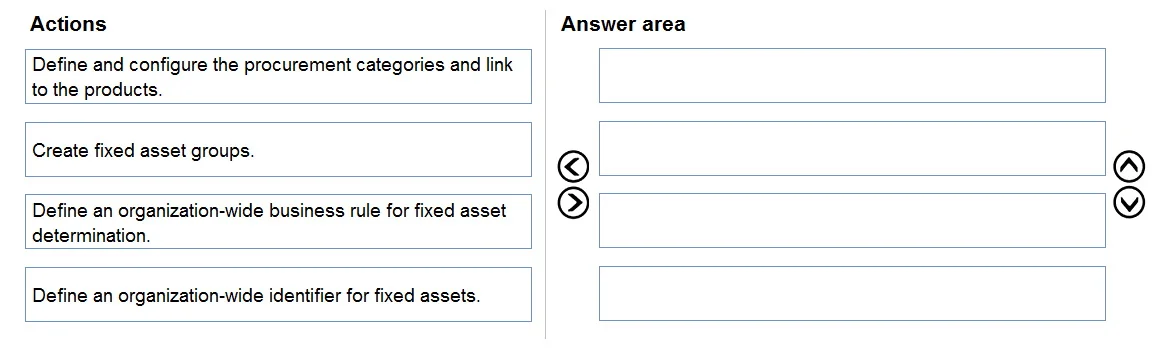
Answer Area
Drag items
Correct arrangement
- Create fixed asset groups.
- Define an organization-wide identifier for fixed assets.
- Define and configure the procurement categories and link to the products.
- Define an organization-wide business rule for fixed asset determination.
Explanation
D365 Finance: Configuring Capitalization Thresholds - Ordering Explained
The Core Logic
This sequence follows a dependency chain: each step creates something that the next step references. You cannot reference an object that doesn't yet exist.
Step-by-Step Breakdown
1. Create fixed asset groups
Why first: Fixed asset groups are foundational master data - they define depreciation profiles, posting profiles, and asset classification. The capitalization business rule (Step 4) must reference a specific fixed asset group to know where to book a newly capitalized asset. You cannot point a rule at a group that doesn't exist yet.
2. Define an organization-wide identifier for fixed assets
Why second: This establishes the number sequence and naming convention used when the system automatically creates fixed asset records. If the identifier isn't set up, the system has no way to generate an asset ID when the capitalization rule fires. This is typically configured in Fixed asset parameters at the legal entity/org level. It must precede procurement setup because once procurement triggers asset creation, the identifier must already be ready.
3. Define and configure procurement categories and link to the products
Why third: Procurement categories are the mechanism that connects purchased products to capitalization rules. The business rule (Step 4) filters by procurement category to determine which products are subject to the threshold. You must link products to their categories before the rule can correctly identify them. Categories themselves have no dependency on Steps 1–2, but the rule in Step 4 needs them already configured.
4. Define an organization-wide business rule for fixed asset determination
Why last: This rule is the capstone - it ties everything together. It specifies: "If a product in [procurement category] is purchased above [threshold amount], auto-create a fixed asset in [fixed asset group] using [identifier]." All three prior steps are direct inputs to this rule. Creating it last ensures all referenced objects exist and are valid.
Common Mistakes & Misconceptions
| Mistake | Why It's Wrong |
|---|---|
| Creating the business rule before fixed asset groups | The rule must reference a group - this will fail validation |
| Skipping the identifier step (thinking it's optional) | Without a number sequence, automatic asset creation will error at runtime |
| Setting up procurement categories after the business rule | The rule needs valid category references; creating it with empty/missing categories leads to incomplete configuration |
| Treating Steps 1 and 2 as interchangeable | While both are foundational, the identifier is specifically needed at the moment of asset creation, which is triggered by the rule - but practically Step 1 should come first since groups are more fundamental |
Key mental model: Think of it as building a form before filling it out. You create the fields (groups, identifiers, categories), then write the rule that uses those fields.
Topics
Community Discussion
No community discussion yet for this question.