
MB-310 · Question #293
Drag and Drop Question A company uses Dynamics 365 Finance for expense management. The company has multiple legal entities and multiple departments. Each department may have a different expense…
The correct answer is Create an organization hierarchy for the departments.; Add a department organization hierarchy to the Expenditure internal control organization hierarchy purpose.; Set the order of precedence in Policy parameter. D365 Finance: Expense Policy Prioritization - Explained Core Concept In Dynamics 365 Finance, expense policies are evaluated through the organization hierarchy system. The system needs to know what hierarchy to use for expense decisions and how to rank conflicts. These three…
Question
Exhibit
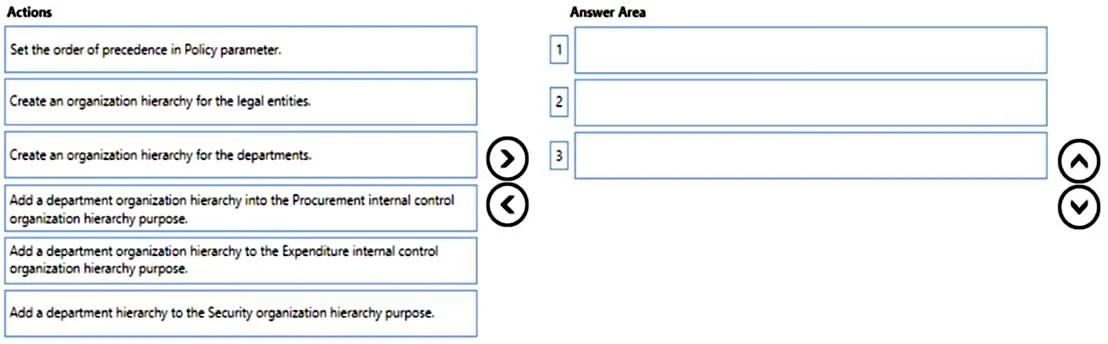
Answer Area
Drag items
Correct arrangement
- Create an organization hierarchy for the departments.
- Add a department organization hierarchy to the Expenditure internal control organization hierarchy purpose.
- Set the order of precedence in Policy parameter.
Explanation
D365 Finance: Expense Policy Prioritization - Explained
Core Concept
In Dynamics 365 Finance, expense policies are evaluated through the organization hierarchy system. The system needs to know what hierarchy to use for expense decisions and how to rank conflicts. These three steps build that chain in logical dependency order.
Step-by-Step Breakdown
Step 1: Create an organization hierarchy for the departments
This is the mandatory foundation. Before the system can evaluate department-level policies, a hierarchy representing those departments must exist. You cannot assign something to a purpose or set precedence for something that doesn't exist yet. This step has no prerequisites - it goes first.
Step 2: Add a department organization hierarchy to the Expenditure internal control organization hierarchy purpose
Organization hierarchy purposes tell D365 Finance which hierarchy to consult for a specific domain. The Expenditure internal control purpose is what drives the Expense management module's policy evaluations. By assigning your new department hierarchy to this purpose, you're registering it as a valid source for expense policy decisions. Without this step, the department hierarchy is invisible to expense management - it exists but does nothing.
Step 3: Set the order of precedence in Policy parameter
With the hierarchy built and registered, you can now configure which level wins in a conflict. In Expense management parameters, the policy precedence order determines whether a department-level policy overrides a legal entity-level policy. This step only makes sense after the hierarchy is in place and assigned.
Why the Other Items Are Wrong
| Item | Reason Excluded |
|---|---|
| Create an organization hierarchy for legal entities | Legal entities are natively represented in D365 - no separate hierarchy needed for them in this scenario. |
| Add to Procurement internal control purpose | That purpose governs purchasing policies, not expense management. Common trap due to similar naming. |
| Add to Security organization hierarchy purpose | Security purposes control data access/role assignments, not policy precedence. |
Common Mistakes
- Picking "Procurement internal control" instead of "Expenditure internal control" - this is the most common error. They sound alike but control entirely different modules.
- Skipping Step 2 and jumping to precedence - the system won't offer meaningful precedence options if the department hierarchy isn't registered to the right purpose.
- Creating a legal entity hierarchy - unnecessary; legal entities are first-class objects in D365 Finance already.
Topics
Community Discussion
No community discussion yet for this question.