
Microsoft
MB-280 · Question #98
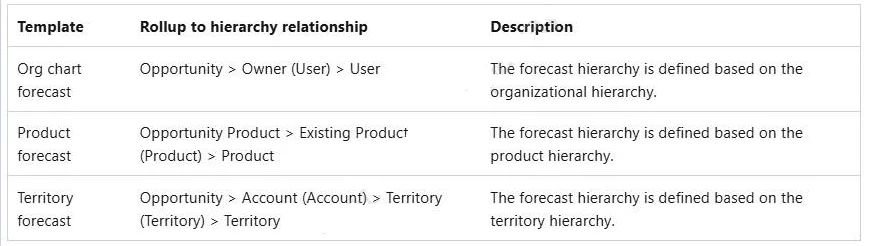
You are using a forecast template. You must configure the forecast by territory. You need to configure the forecast parameters. Which parameter should you configure?
Sign in or unlock MB-280 to reveal the answer and full explanation for question #98. The question stem and answer options stay visible for context.
Configure Dynamics 365 Sales standard and premium features
Question
You are using a forecast template. You must configure the forecast by territory. You need to configure the forecast parameters. Which parameter should you configure?
Exhibit
Options
- AHierarchy table
- BTop of hierarchy
- CHierarchy relationship
- DRollup table.
Unlock MB-280 to see the answer
You've previewed enough free MB-280 questions. Unlock MB-280 for full answers, explanations, the timed quiz mode, progress tracking, and the master PDF. Question stem and options stay visible so you can still see what's on the exam.
Topics
#forecast configuration#territory hierarchy#hierarchy relationship#forecast parameters