MB-280 · Question #158
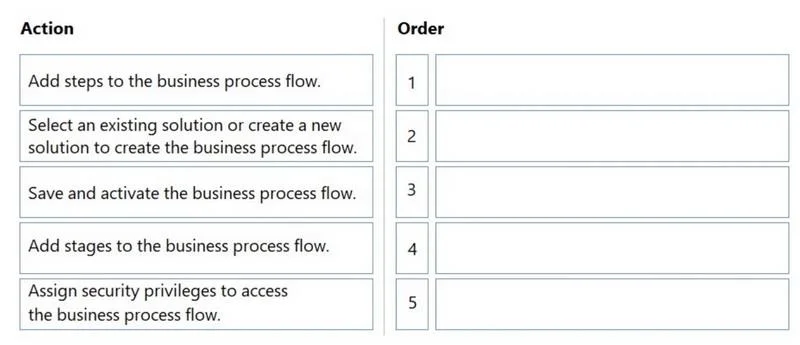
Drag and Drop Question You are working on a Dynamics 365 implementation for a customer. They need to ensure that users follow standardized business processes when entering information. You need to…
The correct answer is Select an existing solution or create a new solution to create the business process flow.; Add stages to the business process flow.; Add steps to the business process flow.; Save and activate the business process flow.; Assign security privileges to access the business process flow. Dynamics 365 Business Process Flow - Step Order Explained The Correct Order & Why --- 1. Select an existing solution or create a new solution This is the mandatory starting point. In Dynamics 365, all customizations - including Business Process Flows (BPFs) - must live inside a…
Question
Exhibit
Answer Area
Drag items
Correct arrangement
- Select an existing solution or create a new solution to create the business process flow.
- Add stages to the business process flow.
- Add steps to the business process flow.
- Save and activate the business process flow.
- Assign security privileges to access the business process flow.
Explanation
Dynamics 365 Business Process Flow - Step Order Explained
The Correct Order & Why
1. Select an existing solution or create a new solution
This is the mandatory starting point. In Dynamics 365, all customizations - including Business Process Flows (BPFs) - must live inside a solution. The solution is the container that packages and transports customizations across environments (dev → test → prod). You cannot begin building a BPF without first establishing this context. Skipping this step means your BPF won't be portable or managed.
Common mistake: Trying to create a BPF directly from the interface without thinking about solution context, resulting in an unmanaged customization that's hard to migrate.
2. Add stages to the business process flow
Stages are the high-level phases of the process (e.g., "Qualify → Develop → Close"). They must be defined before steps because steps are children of stages - you cannot attach a step to a stage that doesn't exist yet. Stages define the structural skeleton of the BPF.
Common mistake: Trying to add steps first. Steps have no parent to attach to without stages.
3. Add steps to the business process flow
Steps are the individual fields or actions within each stage (e.g., "Enter estimated revenue", "Verify contact"). They are always nested inside stages, so they come after. Steps enforce what data users must enter at each phase of the process.
Common mistake: Confusing stages and steps. Stages = major phases; steps = specific fields/tasks within those phases.
4. Save and activate the business process flow
Once the structure is complete, you must save the BPF to persist it and then activate it to make it live and usable. A BPF in draft state is not visible to end users. Activation is a required gate before any user can interact with it.
Common mistake: Forgetting to activate after saving. A saved-but-not-activated BPF appears to "not work" even though it was built correctly.
5. Assign security privileges to access the business process flow
This is last because you can only assign privileges to something that exists and is active. Security roles need to reference the BPF record, which only fully exists after activation. This step controls which user roles can see and use the BPF, following the principle of least privilege.
Common mistake: Assuming all users automatically get access after activation. Without explicit privilege assignment, users may be unable to see or use the BPF.
Summary Mental Model
Container → Structure (macro) → Structure (micro) → Publish → Secure
Solution → Stages → Steps → Activate → Privileges
Each step is a prerequisite gate for the next. You build the house (solution), frame the rooms (stages), furnish them (steps), open the doors (activate), then hand out keys (security).
Topics
Community Discussion
No community discussion yet for this question.