nerdexam
Microsoft

MB-230 · Question #326

Drag and Drop Question You are a customer service schedule administrator for a company. The company hires an electrical engineer who will work remotely. You need to set the resource to enable the…

The correct answer is Create a user record named Electrical Engineer.; Create a user resource record and select the new engineer.; On the resource record, set the start and end location option list to Resource Address. Explanation: Configuring a Remote Worker Resource This question is from Salesforce Field Service (FSL), testing whether you understand the correct sequence to set up a new remote worker as a schedulable resource. --- The Core Logic: Why This Order? The sequence follows a strict…

implement scheduling

Question

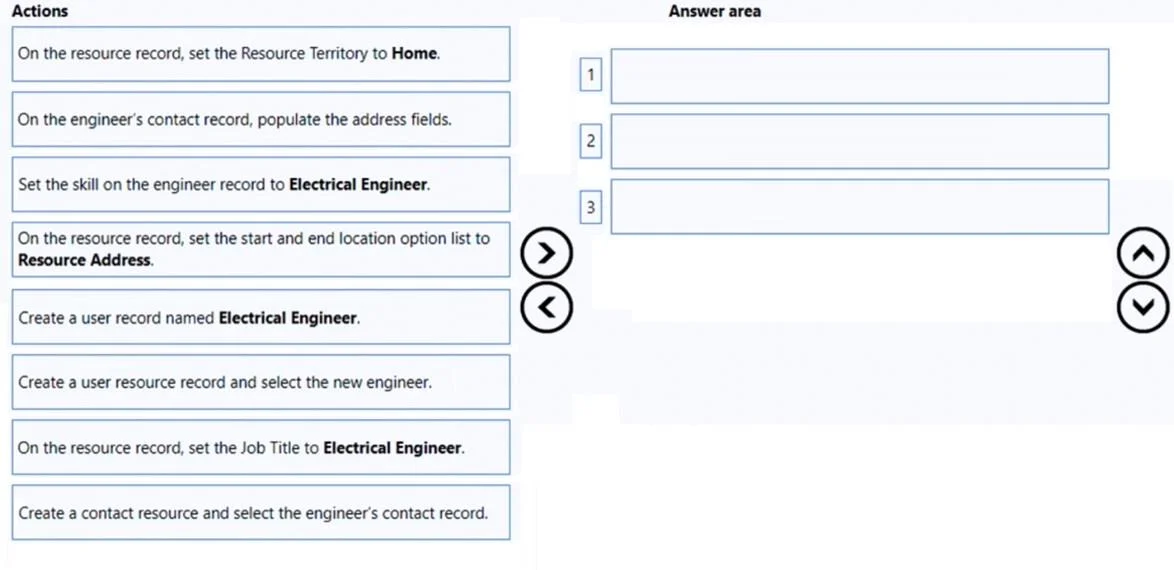
Drag and Drop Question You are a customer service schedule administrator for a company. The company hires an electrical engineer who will work remotely. You need to set the resource to enable the engineer to work remotely. Which three actions should you perform next in sequence? To answer, move the appropriate actions from the list of actions to the answer area and arrange them in the correct order. Answer:

Exhibit
MB-230 question #326 exhibit

Answer Area

Drag items

On the resource record, set the Resource Territory to Home.On the engineer's contact record, populate the address fields.Set the skill on the engineer record to Electrical Engineer.On the resource record, set the start and end location option list to Resource Address.Create a user record named Electrical Engineer.Create a user resource record and select the new engineer.On the resource record, set the Job Title to Electrical Engineer.Create a contact resource and select the engineer's contact record.

Correct arrangement

  • Create a user record named Electrical Engineer.
  • Create a user resource record and select the new engineer.
  • On the resource record, set the start and end location option list to Resource Address.

Explanation

Explanation: Configuring a Remote Worker Resource

This question is from Salesforce Field Service (FSL), testing whether you understand the correct sequence to set up a new remote worker as a schedulable resource.


The Core Logic: Why This Order?

The sequence follows a strict dependency chain - each step creates something the next step requires.


Step-by-Step Breakdown

1. Create a user record named Electrical Engineer

  • Why first: In Salesforce FSL, a Service Resource of type "User" must be backed by an actual Salesforce User record. The user record is the foundation - it provides the identity (login, profile, permissions) that the resource will be linked to.
  • Why not later: You cannot create a user-type resource without an existing user. Attempting step 2 first would leave you with nothing to select.

2. Create a user resource record and select the new engineer

  • Why second: Now that the user exists, you create the Service Resource record and associate it with that user. This is what makes the engineer visible to the scheduling engine (dispatcher console, optimization, etc.).
  • Why not first: There is no user to select yet - the lookup field would be empty or the record wouldn't save correctly.

3. On the resource record, set the start and end location option list to Resource Address

  • Why third: This is what actually enables remote/home-based work. Setting the start/end location to "Resource Address" tells the scheduling engine to calculate travel from the engineer's own address - not a depot or office. This step requires the resource record (step 2) to already exist.
  • Why this matters for remote work: Without this setting, the system defaults to a fixed location (e.g., company office), which would produce incorrect travel time calculations for a remote worker.

Why the Other Options Are Wrong (Distractors)

OptionWhy It's a Distractor
Set Resource Territory to HomeTerritories are for geographic assignment, not remote work configuration. Not required for this scenario.
Populate address fields on contact recordRelevant for contact-type resources, not user-type resources. Also, the engineer here is a user, not a contact.
Set the skill to Electrical EngineerSkills are useful for scheduling rules but are not required to enable remote work - that's a separate configuration task.
Set Job Title to Electrical EngineerJob Title is informational only; it has no functional effect on scheduling or remote work capability.
Create a contact resourceThis is for external workers without Salesforce logins. An engineer with a user record should be a user resource, not a contact resource.

Common Mistakes

  • Confusing contact resources with user resources. If the engineer has a Salesforce login, use a user resource. Contact resources are for contractors or third parties without system access.
  • Trying to set the location before the resource exists. The resource record must exist (step 2) before you can configure its location settings (step 3).
  • Thinking skills or territories are required for remote work. They serve different purposes (routing and filtering) and are not the mechanism that enables remote location-based scheduling.

Topics

#resource configuration#remote resource#resource address#user resource record

Community Discussion

No community discussion yet for this question.

Full MB-230 Practice