nerdexam
Microsoft

MB-230 · Question #248

Drag and Drop Question A company implements Dynamics 365 Customer Service. You are setting up scheduling to dispatch repair technicians. You encounter the following issues: - You are unable to create

The correct answer is Security roles; Business closures; Working hours. Dynamics 365 Customer Service - Scheduling Issues Explained The Three Issues and Their Correct Resolutions --- Issue 1: Unable to create a new organizational unit → Security roles Why: Organizational units in Dynamics 365 are administrative entities used to group resources by loc

implement scheduling

Question

Drag and Drop Question A company implements Dynamics 365 Customer Service. You are setting up scheduling to dispatch repair technicians. You encounter the following issues:

  • You are unable to create a new organizational unit.
  • Repair technicians are accidentally scheduled to work on days when

company is on holiday.

  • RepairTechnicianA does not appear on the schedule for Fridays for any

issue. You need to resolve the issues. What should you modify to correct the issues? To answer, drag the appropriate resolutions to the correct issues. Each source may be used once, more than once, or not at all. You may need to drag the split bar between panes or scroll to view content. NOTE: Each correct selection is worth one point. Answer:

Exhibit
MB-230 question #248 exhibit

Answer Area

Drag items

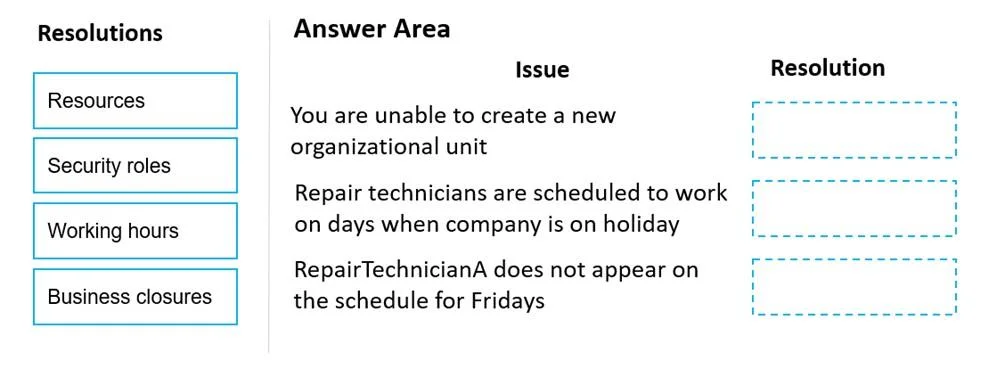
ResourcesSecurity rolesWorking hoursBusiness closures

Correct arrangement

  • Security roles
  • Business closures
  • Working hours

Explanation

Dynamics 365 Customer Service - Scheduling Issues Explained

The Three Issues and Their Correct Resolutions


Issue 1: Unable to create a new organizational unit → Security roles

Why: Organizational units in Dynamics 365 are administrative entities used to group resources by location or division. The ability to create them is controlled by user permissions. If a user cannot create one, their assigned security role lacks the necessary Create privilege on the Organizational Unit entity.

Fix: Modify the user's security role to grant the appropriate privileges (Create/Write on Organizational Units).

Common mistake: People assume this is a "Resources" problem because it's a scheduling setup task. It's not - it's purely a permissions/access issue.


Issue 2: Technicians scheduled on holidays → Business closures

Why: Business closures is the dedicated feature in Dynamics 365 for defining company-wide holidays and non-working days. When configured, the scheduling engine automatically excludes those dates. If holidays aren't entered as business closures, the system has no awareness of them and will happily book technicians on those days.

Fix: Add the company's holidays to the Business Closures list under Service Management settings.

Common mistake: People try to solve this by editing individual technicians' working hours. That would require updating every resource manually and still wouldn't enforce a company-wide policy - Business Closures is the correct, scalable solution.


Issue 3: RepairTechnicianA absent from Friday schedule → Working hours

Why: Each resource (technician) has a Working Hours calendar that defines which days and times they are available. If RepairTechnicianA never appears on Fridays, Fridays are simply not included in their working hours configuration - the scheduler excludes them automatically.

Fix: Edit RepairTechnicianA's working hours record to include Fridays as a working day.

Common mistake: Confusing this with a "Resources" issue. The resource record itself exists (they appear other days), so the resource isn't missing - only their availability on a specific day is misconfigured.


Why "Resources" is Not Used Here

Resources is a distractor. It would be relevant if a technician didn't exist in the system at all, or wasn't configured as a bookable resource. None of the three issues described are resource existence problems - they are permissions, holiday policy, and availability calendar problems.

Topics

#organizational units#business closures#working hours#resource scheduling

Community Discussion

No community discussion yet for this question.

Full MB-230 Practice