
Microsoft
MB-230 · Question #233
Case Study 3 - The Phone Company Overview The Phone Company provides mobile devices and services to corporate clients. Each client corporation has different agreements and service level agreements…
Sign in or unlock MB-230 to reveal the answer and full explanation for question #233. The question stem and answer options stay visible for context.
manage analytics, visualizations, and insights
Question
Case Study 3 - The Phone Company Overview The Phone Company provides mobile devices and services to corporate clients. Each client corporation has different agreements and service level agreements (SLAs) in place. Most clients have agreements that last one year and have 30 cases available. Half the cases may be opened by phone. The other half may be opened by email. The company has an existing on-premises software system. The current system no longer meets the company's needs. The support desk is open 8:00 am to 8:00 pm Eastern Standard Time. Requirements Support desk The company plans to implement Dynamics 365. The solution will include a custom entity that needs to be search enabled. You must configure the system to ensure that you can determine how many support tickets and new orders tickets are received. You must be able to determine which device types have the most tickets opened for issues. Business hours in the system must reflect the hours support staff is scheduled. Case handling New cases must automatically route to the correct support group by phone type or new purchase group without requiring custom code. The system must automatically create a case when email is received by companies that are not in the system. The system must automatically send a response to an email sender upon case creation for new orders, but not for service records. Users must be able to initiate routing for manually created cases. The system must create sub-cases from one customer with different cases and also if the same issue is reported by several customers. Subcases must inherit the following fields: customer name, contact email address and case title. Main cases must not be closed until all the sub-cases are closed. Separate groups must be created for each type of service and each phone type. Access to the groups must be restricted to team members that support that service or phone type. When importing from the old system, old cases do not need to be routed to the correct support group. Knowledge base Users must be able to search the knowledge base when opening a new case form or when checking on cases. Users must be able to use relevant searches and include any customer entities. Dashboards Managers must be able to see a real-time list of open cases, open activities, and expiring entitlements all on one page. Managers must also be able to see all open cases, escalated cases and cases by representatives on one screen. Managers must be able to drill down within each area. Managers need a dashboard that displays weekly statistics for cases and representatives. Each representative needs to see their own tickets that are opened for the day, week, and month as well as their closed tickets. Service-level agreements Most customers must be contacted within 90 minutes of their case being opened. Some customers can purchase faster service on call backs. Emails must be sent to support managers when service-level agreements (SLAs) are missed. Support representatives must be able to see a timer on each case form to ensure they are adhering to their SLAs. SLA KPIs must be tracked in the system. SLA KPIs must appear on the case form. Cases must be able to be placed on hold if issues arise with related contracts. Issues Users report they are not able to search the Knowledge Base. Drag and Drop Question You need to create the dashboards. Which dashboard types should you use? To answer, drag the appropriate dashboard types to the correct scenario. Each dashboard type may be used once, more than once, or not at all. You may need to drag the split bar between panes or scroll to view content. NOTE: Each correct selection is worth one point. Answer:
Exhibit
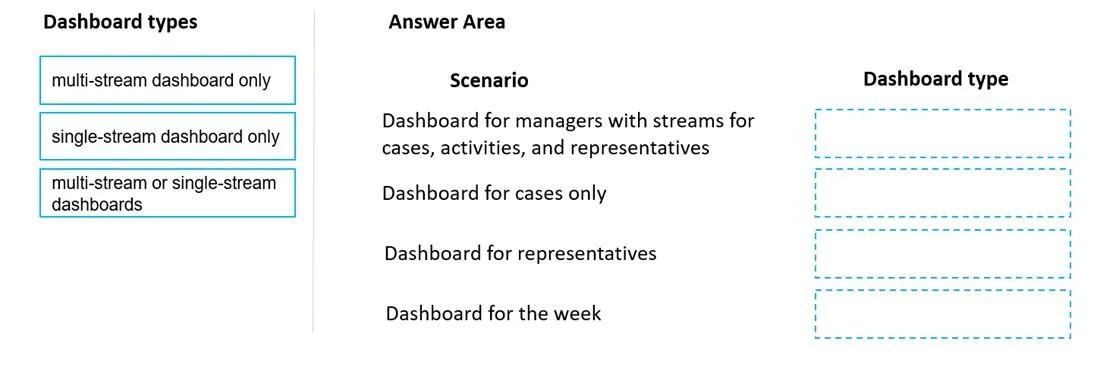
Answer Area
Drag items
multi-stream dashboard onlysingle-stream dashboard onlymulti-stream or single-stream dashboards
Unlock MB-230 to see the answer
You've previewed enough free MB-230 questions. Unlock MB-230 for full answers, explanations, the timed quiz mode, progress tracking, and the master PDF. Question stem and options stay visible so you can still see what's on the exam.
Topics
#dashboard types#multi-stream dashboard#single-stream dashboard#case analytics