
JN0-696 · Question #64
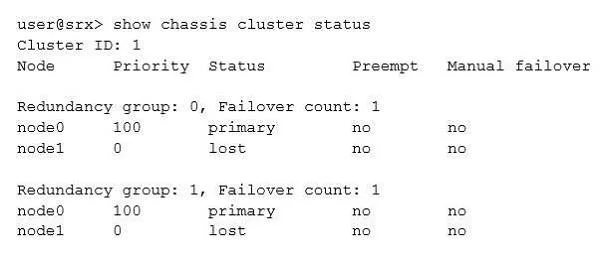
Click the Exhibit button. You recently configured a chassis cluster between two branch SRX Series devices and realize that the cluster is not functional, with node device status lost. Referring to…
The correct answer is B. Confirm that the software on both devices is the same Junos OS version. D. Confirm that the hardware on both devices is the same. Chassis Cluster prerequisites include: B: The SOFTWARE on both standalone devices must be the same Junos OS version. Verify using this command on both devices: root> show version JUNOS Software Release [11.4R7.5] D: Confirm that the HARDWARE on both devices is the same. Verify…
Question
Click the Exhibit button. You recently configured a chassis cluster between two branch SRX Series devices and realize that the cluster is not functional, with node device status lost. Referring to the exhibit, which two actions will correct this problem? (Choose two.)
Exhibit
Options
- AConfirm both devices are synchronized with the local NTP.
- BConfirm that the software on both devices is the same Junos OS version.
- CConfirm both devices are running with the same security policies.
- DConfirm that the hardware on both devices is the same.
How the community answered
(69 responses)- A10% (7)
- B84% (58)
- C6% (4)
Explanation
Chassis Cluster prerequisites include: B: The SOFTWARE on both standalone devices must be the same Junos OS version. Verify using this command on both devices: root> show version JUNOS Software Release [11.4R7.5] D: Confirm that the HARDWARE on both devices is the same. Verify using this command on both devices: root@srx220> show chassis hardware detail
Topics
Community Discussion
No community discussion yet for this question.