
JN0-696 · Question #63
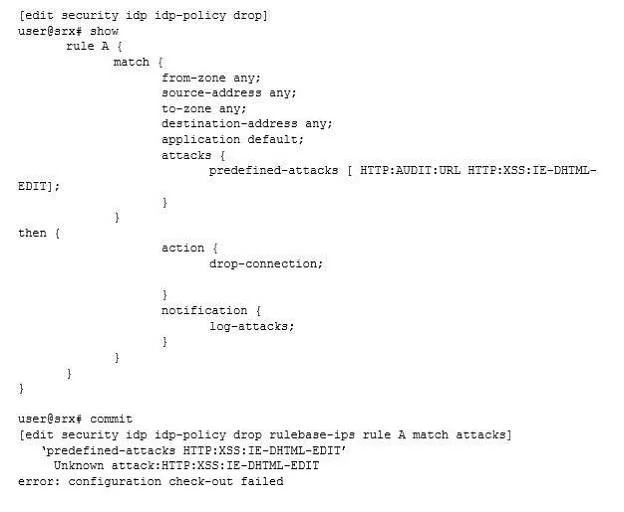
Click the Exhibit button. A customer updated their attack database to the current version and performed some changes to the configuration. When the customer tried to commit the changes, they…
The correct answer is A. Delete the unknown attack from the policy. Note: Predefined attack objects are listed in an alphabetical order. These attack objects have unique names that help you identify the attack. The first part of the name indicates the group to which the attack object belongs. For example: FTP:USER:ROOT--Belongs to the FTP:USER…
Question
Click the Exhibit button. A customer updated their attack database to the current version and performed some changes to the configuration. When the customer tried to commit the changes, they received the error shown in the exhibit. In this scenario, which action will remove the error?
Exhibit
Options
- ADelete the unknown attack from the policy.
- BAdd the attack to a specific zone.
- CAdd only the attack in a new rule.
- DCreate a new action.
How the community answered
(38 responses)- A84% (32)
- B3% (1)
- C3% (1)
- D11% (4)
Explanation
Note: Predefined attack objects are listed in an alphabetical order. These attack objects have unique names that help you identify the attack. The first part of the name indicates the group to which the attack object belongs. For example: FTP:USER:ROOT--Belongs to the FTP:USER group. It detects attempts to log in to an FTP server using the root account. HTTP:HOTMAIL:FILE-UPLOAD--Belongs to the HTTP:HOTMAIL group. It detects files attached to e-mails sent via the Web-based e-mail service Hotmail. object-andobject-group-understanding.html
Topics
Community Discussion
No community discussion yet for this question.