
JN0-696 · Question #46
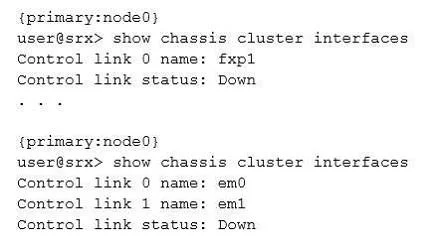
Click the Exhibit button. You are reviewing the status of a high-end SRX Series chassis cluster and notice that some interfaces have error messages. Referring to the exhibit, which two steps would…
The correct answer is B. Verify if there are Layer 1 or Layer 2 issues between the node devices. C. Recognize the control link port to a different Services Processing Card (SPC), move the cable, and. B: If the Control Link is SFP-type port, change the transceiver on both ends. Ensure that the transceivers are same type (LX, SX, etc.) and that they are Juniper-branded parts. C: Change the cable that you are using for control link. Is the interface link light GREEN now? Yes…
Question
Click the Exhibit button. You are reviewing the status of a high-end SRX Series chassis cluster and notice that some interfaces have error messages. Referring to the exhibit, which two steps would you use to troubleshoot the problem? (Choose two.)
Exhibit
Options
- AVerify the security policies for incoming traffic.
- BVerify if there are Layer 1 or Layer 2 issues between the node devices.
- CRecognize the control link port to a different Services Processing Card (SPC), move the cable, and
- DReconfigure the firewall filters to allow traffic.
How the community answered
(20 responses)- A5% (1)
- B80% (16)
- D15% (3)
Explanation
B: If the Control Link is SFP-type port, change the transceiver on both ends. Ensure that the transceivers are same type (LX, SX, etc.) and that they are Juniper-branded parts. C: Change the cable that you are using for control link. Is the interface link light GREEN now? Yes - Previous link cable was faulty. Recommend to now reboot both the nodes simultaneously.
Topics
Community Discussion
No community discussion yet for this question.