nerdexam
HP

HPE7-A06 · Question #74

Drag and Drop Question Match the customer requirement with the relevant commands. Answer:

The correct answer is Create a pre-authentication role and associate a VLAN.; Associate a policy to the role above allowing only UDP port 67.; Configure the pre-authentication role on the client-facing interface.; Configure ClearPass as an additional IP helper for the profiling VLAN SVI. Explanation: ClearPass Pre-Authentication Profiling Configuration This question describes configuring Aruba device profiling using ClearPass and DHCP fingerprinting. The goal is to intercept DHCP traffic from unauthenticated clients so ClearPass can identify devices before…

Implementing Complex Campus Access Switching

Question

Drag and Drop Question Match the customer requirement with the relevant commands. Answer:

Exhibit
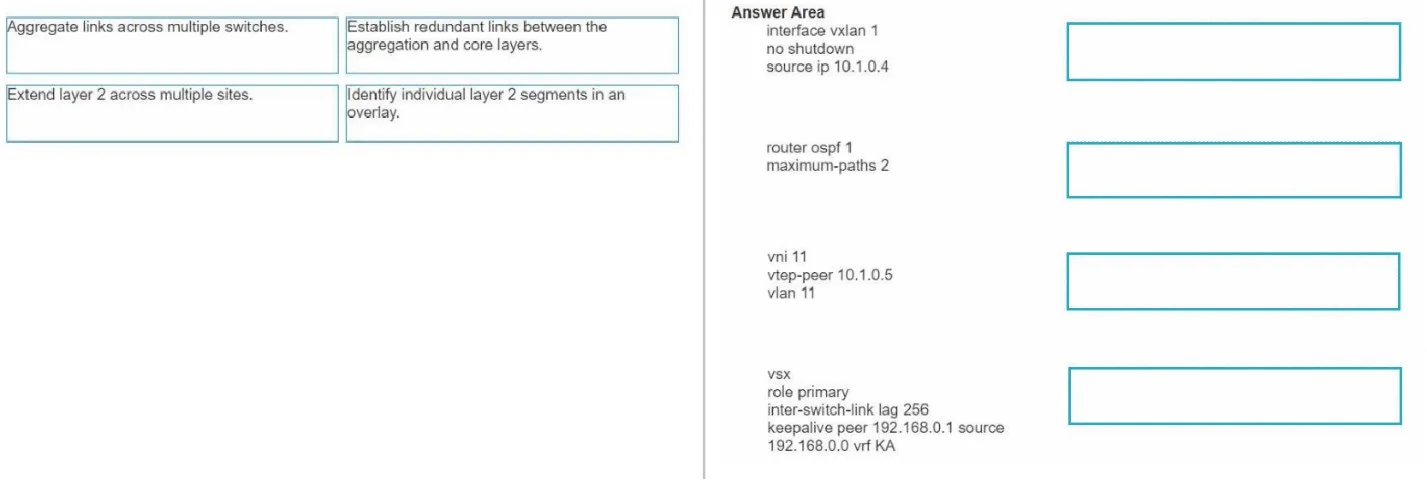
HPE7-A06 question #74 exhibit

Answer Area

Drag items

Create a pre-authentication role and associate a VLAN.Associate a policy to the role above allowing only UDP port 67.Associate a policy to the role above allowing only UDP port 68.Configure the pre-authentication role on the client-facing interface.Configure ClearPass as an additional IP helper for the profiling VLAN SVI.Configure ClearPass as an additional IP helper for the client VLAN SVI.

Correct arrangement

  • Create a pre-authentication role and associate a VLAN.
  • Associate a policy to the role above allowing only UDP port 67.
  • Configure the pre-authentication role on the client-facing interface.
  • Configure ClearPass as an additional IP helper for the profiling VLAN SVI.

Explanation

Explanation: ClearPass Pre-Authentication Profiling Configuration

This question describes configuring Aruba device profiling using ClearPass and DHCP fingerprinting. The goal is to intercept DHCP traffic from unauthenticated clients so ClearPass can identify devices before granting them access.


Why These Four Items - In This Order


1. Create a pre-authentication role and associate a VLAN.

This is the mandatory foundation. A pre-auth role defines what an unauthenticated client is allowed to do. Associating a VLAN isolates pre-auth clients into their own network segment (the "profiling VLAN"), separate from authenticated users. Nothing else can be built without this existing first.


2. Associate a policy to the role above allowing only UDP port 67.

UDP port 67 is the DHCP server port - clients send DHCP Discover/Request packets destined to port 67. Allowing only this port in the pre-auth role means:

  • The client can send DHCP requests (needed for IP assignment and fingerprinting).
  • All other traffic is blocked, enforcing a truly restricted pre-auth state.

Common mistake: Choosing UDP port 68 instead. Port 68 is the DHCP client port (where the client receives the server's response). You allow outbound requests (→ port 67), not the response port. The DHCP reply is handled at the infrastructure level, not by a client-side policy rule here.


3. Configure the pre-authentication role on the client-facing interface.

Only after the role and its policy exist can you apply the role to the switch interface where clients physically connect. This is the enforcement step - it tells the switch to place any unauthenticated client arriving on that port into the pre-auth role automatically.

Common mistake: Trying to configure the interface before defining the role - the role must exist first.


4. Configure ClearPass as an additional IP helper for the profiling VLAN SVI.

An IP helper address relays DHCP broadcasts (which don't cross VLANs) as unicast to a specified server. Adding ClearPass in addition to your existing DHCP server on the profiling VLAN SVI means:

  • The client still gets an IP address from the normal DHCP server.
  • ClearPass also receives a copy of every DHCP request and can extract the DHCP fingerprint to identify the device type (OS, vendor, etc.).

Common mistake: Configuring ClearPass as an IP helper on the client VLAN SVI (the wrong item). That VLAN is for authenticated clients - profiling must happen during the pre-auth phase, so the relay must be on the profiling VLAN SVI, not the post-auth client VLAN.


Why the Two Excluded Items Are Wrong

Excluded ItemWhy Wrong
Allow UDP port 68Port 68 is the DHCP response port (client-receive). The policy controls outbound client requests, which go to port 67.
IP helper on client VLAN SVIProfiling must happen before authentication. The client VLAN is post-auth - ClearPass needs to see traffic on the pre-auth/profiling VLAN.

Summary Flow

Define role + VLAN → Restrict to DHCP requests only (port 67)
→ Apply role to interface → Forward DHCP to ClearPass for profiling

The ordering is strictly logical: define before applying, and restrict before forwarding.

Topics

#CLI commands#network configuration#customer requirements#campus switching

Community Discussion

No community discussion yet for this question.

Full HPE7-A06 Practice