
FCP_ZCS_AD-7.4 · Question #18
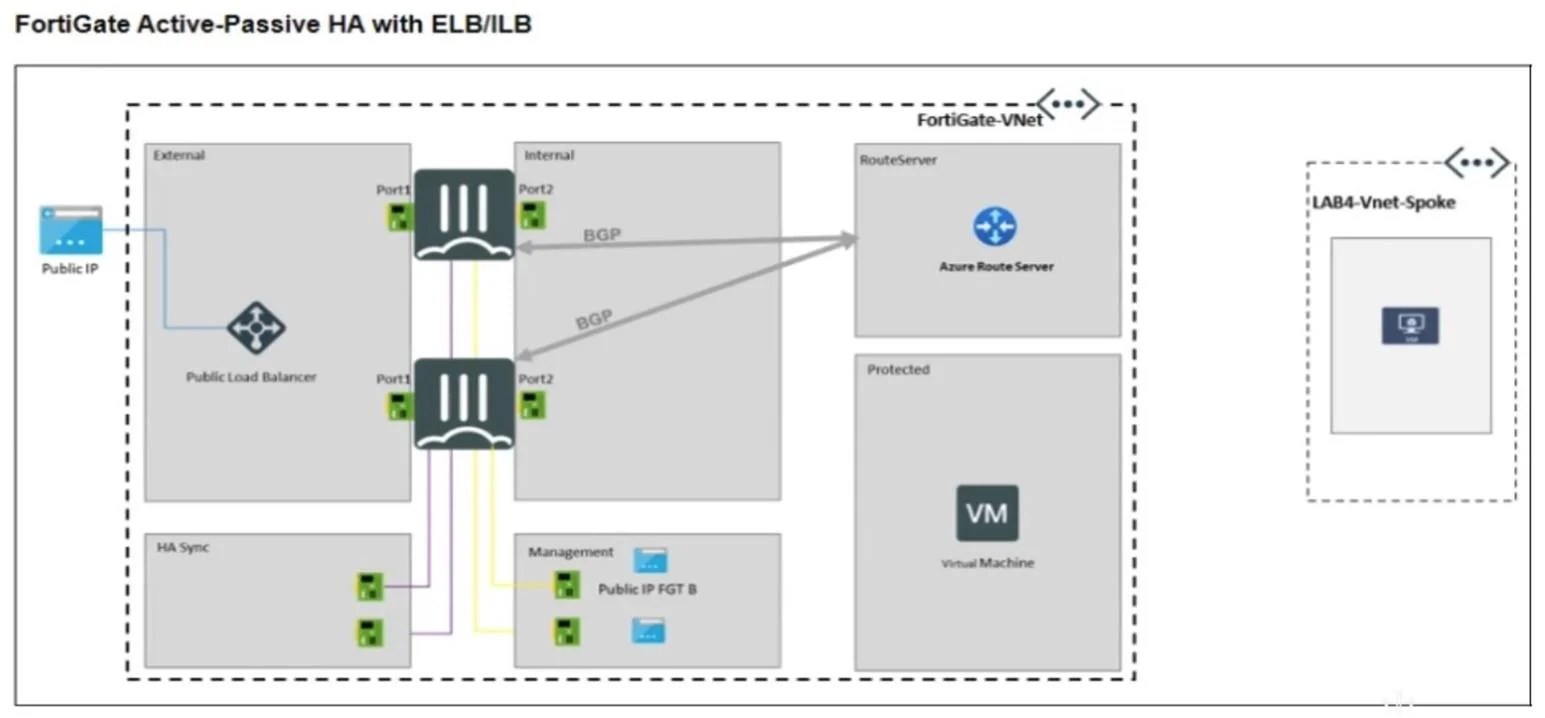
Refer to the exhibit. An Azure Route Server and an active-passive FortiGate with Elastic Load Balancing (ELB) and Internal Load Balancing (ILB) have been deployed successfully and they are sharing…
The correct answer is A. Monitor effective routes on the Azure network interface (NIC) of the Linux server. The Linux server in the spoke VNet cannot directly peer BGP with the Azure Route Server, as it is not a BGP-enabled device. Instead, Azure propagates routes to VMs through the effective route tables associated with their network interfaces (NICs). Therefore, to diagnose why BGP…
Question
Refer to the exhibit. An Azure Route Server and an active-passive FortiGate with Elastic Load Balancing (ELB) and Internal Load Balancing (ILB) have been deployed successfully and they are sharing and populating BGP routes in the Protected VNet. A Linux server has been deployed in a new VNet spoke. It is expected that Azure Route Server should inject the FortiGate BGP routes into the Linux server but that failed. How can you diagnose the problem?
Exhibit
Options
- AMonitor effective routes on the Azure network interface (NIC) of the Linux server
- BReview FortiGate BGP neighbors
- CVerify the BGP setup on Azure Route Server
- DLinux server doesn't support BGP negotiation with Azure Route Server
How the community answered
(47 responses)- A74% (35)
- B15% (7)
- C6% (3)
- D4% (2)
Explanation
The Linux server in the spoke VNet cannot directly peer BGP with the Azure Route Server, as it is not a BGP-enabled device. Instead, Azure propagates routes to VMs through the effective route tables associated with their network interfaces (NICs). Therefore, to diagnose why BGP routes are not reaching the Linux VM, you should monitor the effective routes on the NIC to verify if the routes from the FortiGate (via the Route Server) are being injected properly.
Topics
Community Discussion
No community discussion yet for this question.