
FCP_ZCS_AD-7.4 · Question #45
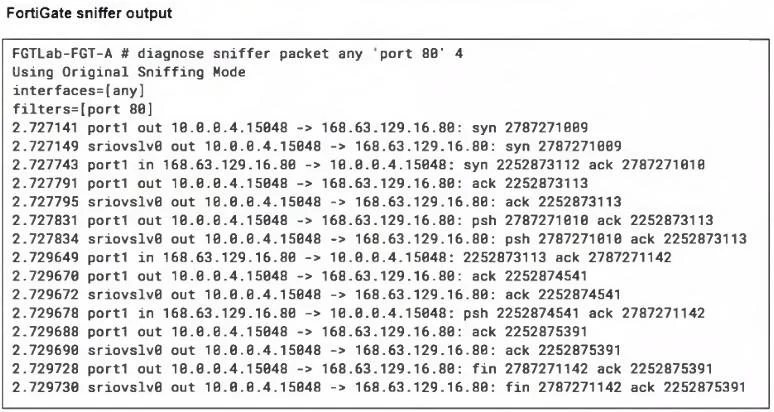
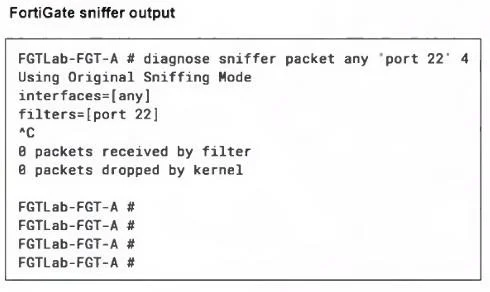
Refer to the exhibits. A high availability (HA) active-active FortiGate with Elastic Load Balancing (ELB) and Internal Load Balancing (ILB) was deployed with a default setup to filter traffic to a…
The correct answer is B. Add a new Azure load balancing rule. Azure Load Balancer does not directly support defining a port range within a single load balancing rule. Instead, you need to create individual rules for each port you want to forward. For example, if you need to forward traffic for ports 65520 to 65530, you would need to…
Question
Refer to the exhibits. A high availability (HA) active-active FortiGate with Elastic Load Balancing (ELB) and Internal Load Balancing (ILB) was deployed with a default setup to filter traffic to a Linux server running Apache server. Ports 80 and 22 are open on the Linux server, and on FortiGate a VIP and firewall policy are configured to allow traffic through ports 80 and 22. Traffic on port 80 is successful, but traffic on port 22 is not detected by FortiGate. What configuration changes could you perform to allow SSH traffic?
Exhibits
Options
- AConfigure a customized port under the Frontend IP configuration
- BAdd a new Azure load balancing rule
- CInclude the Linux server in the back-end pool options
- DAdd a new Inbound NAT rule
How the community answered
(27 responses)- A15% (4)
- B78% (21)
- C4% (1)
- D4% (1)
Explanation
Azure Load Balancer does not directly support defining a port range within a single load balancing rule. Instead, you need to create individual rules for each port you want to forward. For example, if you need to forward traffic for ports 65520 to 65530, you would need to create 11 separate load balancing rules. Inbound NAT rules are generally used to map destination ports to specific VMs in the backend pool rather than listening on additional ports.
Topics
Community Discussion
No community discussion yet for this question.