
FCP_ZCS_AD-7.4 · Question #17
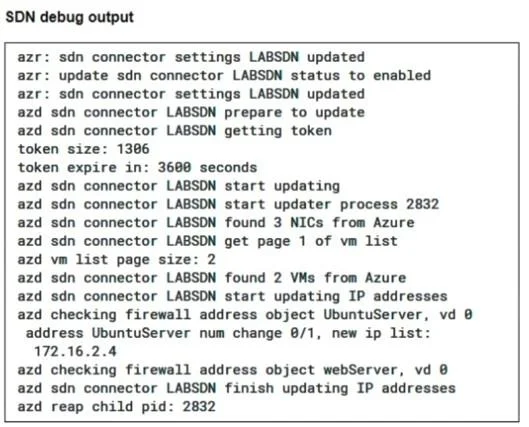
Refer to the exhibits. Two new dynamic firewall addresses have been configured on the FortiGate VM using the external connector to Integrate within the same Azure environment. The debug output shows…
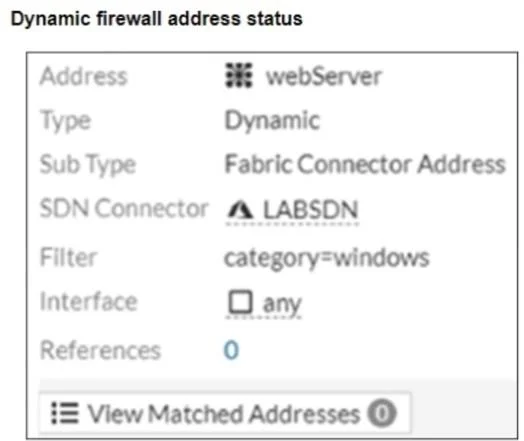
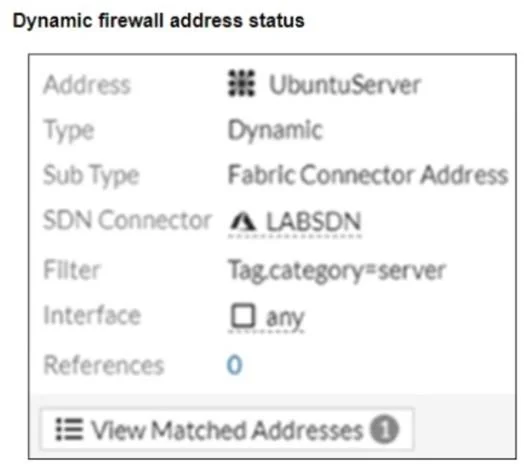
The correct answer is A. Verify the filter used for the dynamic firewall address B. Verify the tags on the target VM. The debug output shows that the UbuntuServer address object successfully resolved an IP, while the webServer did not. The most likely cause is a mismatch in the dynamic address filter or missing tags on the target VM. Verify the filter used for the dynamic firewall address ?The…
Question
Refer to the exhibits. Two new dynamic firewall addresses have been configured on the FortiGate VM using the external connector to Integrate within the same Azure environment. The debug output shows that one IP address can be resolved successfully, but the second is empty. Which steps could you perform to correct the misconfiguration? (Choose all that apply.)
Exhibits
Options
- AVerify the filter used for the dynamic firewall address
- BVerify the tags on the target VM
- CCheck for a mistyped Microsof Entra ID subscription
- DVerify the NSG for the target VM
- EVerify the Microsoft Entra ID role assignment access rights
How the community answered
(30 responses)- A83% (25)
- C10% (3)
- D3% (1)
- E3% (1)
Explanation
The debug output shows that the UbuntuServer address object successfully resolved an IP, while the webServer did not. The most likely cause is a mismatch in the dynamic address filter or missing tags on the target VM. Verify the filter used for the dynamic firewall address ?The filter category=windows may not match any VM metadata, resulting in no matched addresses. Verify the tags on the target VM ?Ensure that the VM has the correct tags (e.g., category=windows) that match the dynamic address filter to enable resolution.
Topics
Community Discussion
No community discussion yet for this question.