
Fortinet
FCP_ZCS_AD-7.4 · Question #19
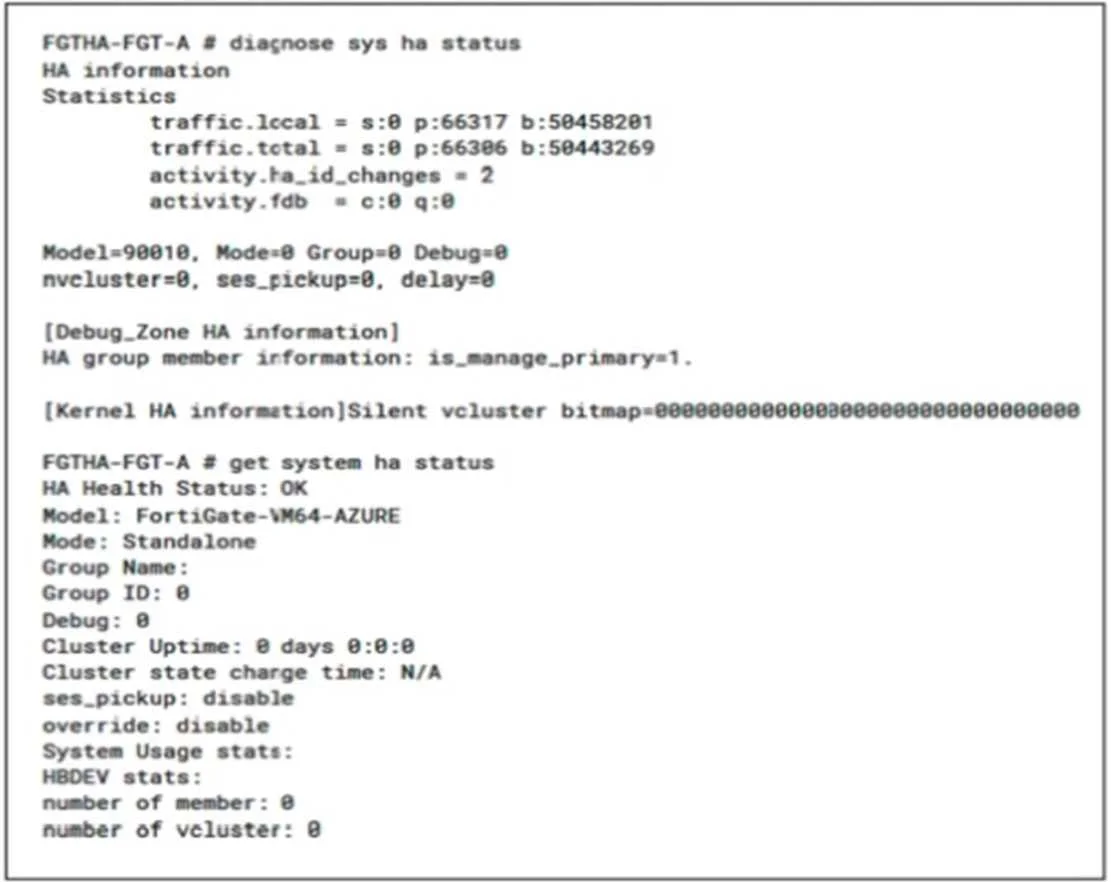
Refer to the exhibit. A high availability, active-active FortiGate with Elastic Load Balancing (ELB) and Internal Load Balancing (ILB) was deployed in your Azure environment. Which tools can you use…
The correct answer is B. Autoscale E. FortiManager. Active-Active Azure FGT clusters by default will NOT sync config. You have 2 options: 1: Use FortiManager 2: Use autoscaling (VMSS) - which in turn uses config-sync cluster.
Deploying FortiGate-VM on Azure
Question
Refer to the exhibit. A high availability, active-active FortiGate with Elastic Load Balancing (ELB) and Internal Load Balancing (ILB) was deployed in your Azure environment. Which tools can you use to configure synchronization? (Choose two.)
Exhibit
Options
- AFortiGate Clustering Protocol (FGCP)
- BAutoscale
- CHeartbeat interfaces
- DSoftware-defined network (SDN) Fabric Connector
- EFortiManager
How the community answered
(34 responses)- A3% (1)
- B85% (29)
- C3% (1)
- D9% (3)
Explanation
Active-Active Azure FGT clusters by default will NOT sync config. You have 2 options: 1: Use FortiManager 2: Use autoscaling (VMSS) - which in turn uses config-sync cluster.
Topics
#active-active HA#autoscale#FortiManager#configuration synchronization
Community Discussion
No community discussion yet for this question.