
FCP_FGT_AD-7.6 · Question #109
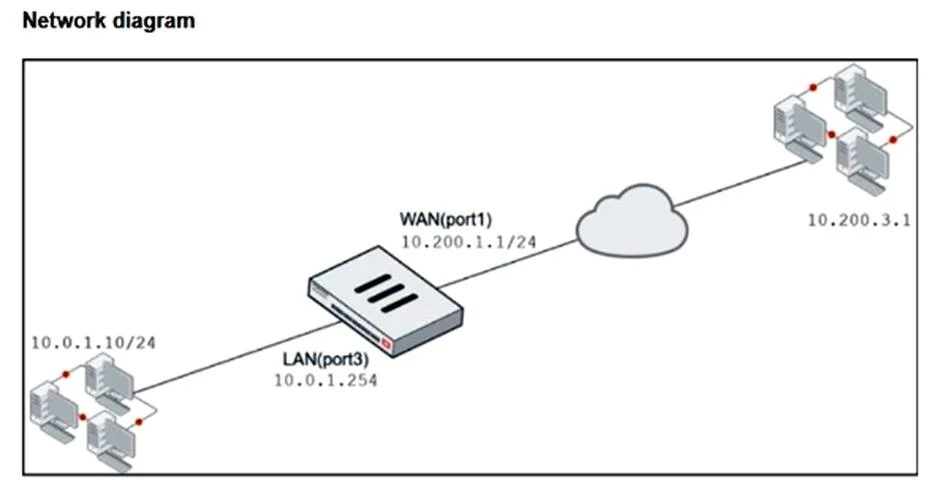
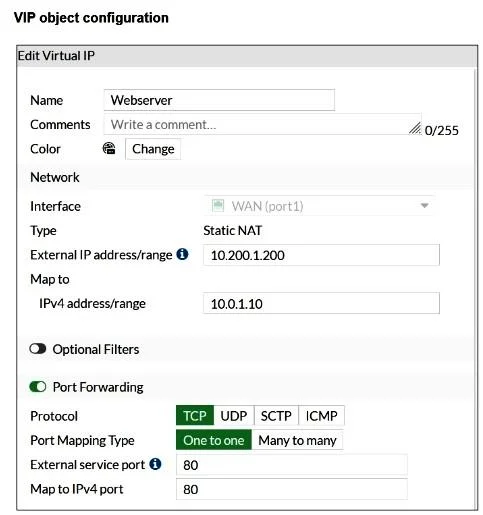
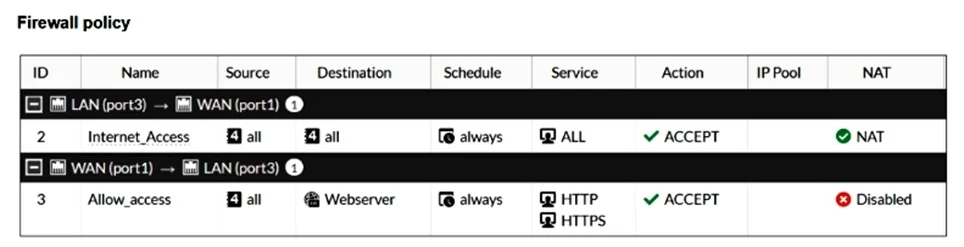
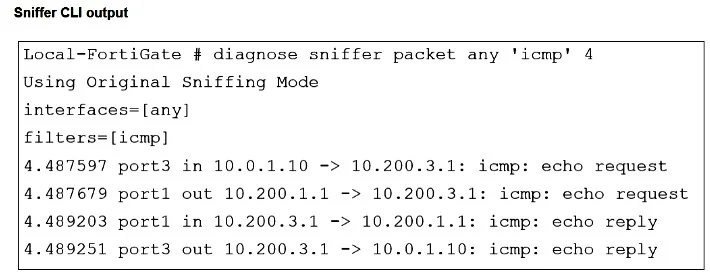
Refer to the exhibits. The exhibits show a diagram of a FortiGate device connected to the network, VIP configuration, firewall policy, and the sniffer CLI output on the FortiGate device. The WAN…
The correct answer is C. Disable port forwarding on the VIP object. D. Create a new firewall policy before Internet_Access for the webserver and apply the IP pool. The current VIP is configured with port forwarding, so it only applies to TCP/80 traffic. To use the VIP’s external address (10.200.1.200) as the source for any outbound sessions (such as ICMP ping), the VIP must be a full static 1-to-1 NAT, which requires disabling port…
Question
Refer to the exhibits. The exhibits show a diagram of a FortiGate device connected to the network, VIP configuration, firewall policy, and the sniffer CLI output on the FortiGate device. The WAN (port1) interface has the IP address 10.200.1.1/24. The LAN (port3) interface has the IP address 10.0.1.254/24. The webserver host (10.0.1.10) must use its VIP external IP address as the source NAT (SNAT) when it pings remote server (10.200.3.1). Which two statements are valid to achieve this goal? (Choose two.)
Exhibits
Options
- AEnable NAT on the Allow_access firewall policy.
- BDisable NAT on the Internet_Access firewall policy.
- CDisable port forwarding on the VIP object.
- DCreate a new firewall policy before Internet_Access for the webserver and apply the IP pool.
How the community answered
(21 responses)- A10% (2)
- B19% (4)
- C71% (15)
Explanation
The current VIP is configured with port forwarding, so it only applies to TCP/80 traffic. To use the VIP’s external address (10.200.1.200) as the source for any outbound sessions (such as ICMP ping), the VIP must be a full static 1-to-1 NAT, which requires disabling port forwarding. You then need a dedicated firewall policy for the webserver that is placed before the generic Internet_Access policy and that uses an IP pool with 10.200.1.200. Traffic from 10.0.1.10 will match this policy first and be SNATed to 10.200.1.200, so the remote server 10.200.3.1 sees the VIP external IP as the source.
Topics
Community Discussion
No community discussion yet for this question.