
Fortinet
FCP_FGT_AD-7.6 · Question #52
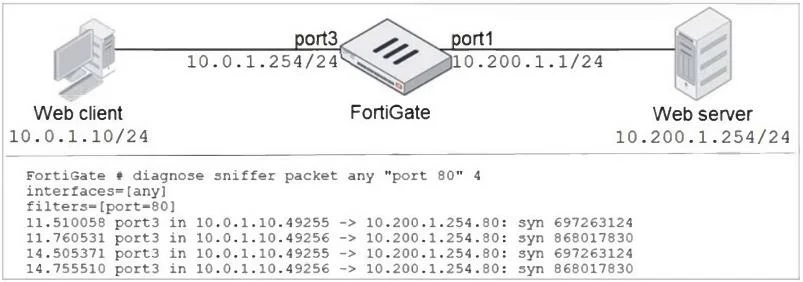
Refer to the exhibit. In the network shown in the exhibit, the web client cannot connect to the HTTP web server. The administrator runs the FortiGate built-in sniffer and gets the output shown in…
The correct answer is A. Execute a debug flow. If FortiGate is dropping packets, can a packet capture (sniffer) be used to identify the reason? To find the cause, you should use the debug (packet) flow.
Submitted by lukas.cz· Apr 18, 2026Firewall policies and authentication
Question
Refer to the exhibit. In the network shown in the exhibit, the web client cannot connect to the HTTP web server. The administrator runs the FortiGate built-in sniffer and gets the output shown in the exhibit. What should the administrator do next, to troubleshoot the problem?
Exhibit
Options
- AExecute a debug flow.
- BCapture the traffic using an external sniffer connected to port1.
- CExecute another sniffer on FortiGate, this time with the filter "host 10.0.1.10".
- DRun a sniffer on the web server.
How the community answered
(39 responses)- A79% (31)
- B13% (5)
- C5% (2)
- D3% (1)
Explanation
If FortiGate is dropping packets, can a packet capture (sniffer) be used to identify the reason? To find the cause, you should use the debug (packet) flow.
Topics
#Troubleshooting#FortiGate Diagnostics#Packet Flow#Network Connectivity
Community Discussion
No community discussion yet for this question.