
FCP_FGT_AD-7.6 · Question #108
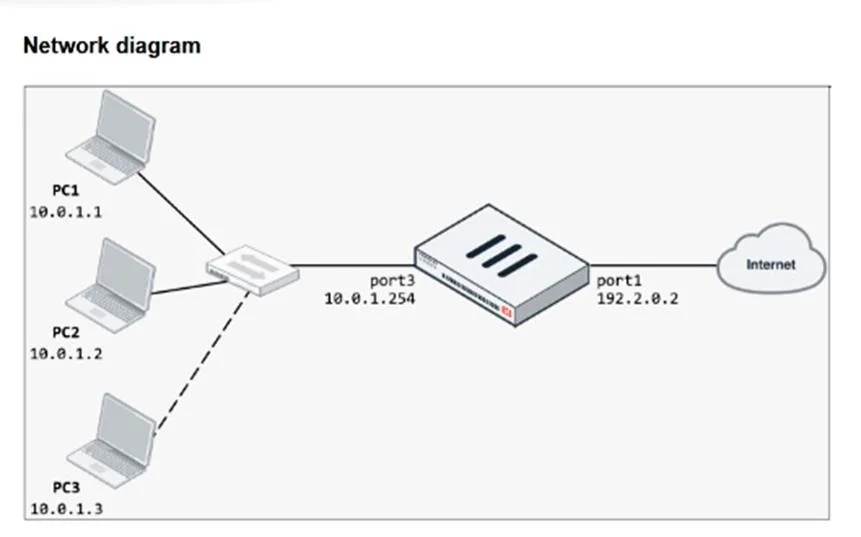
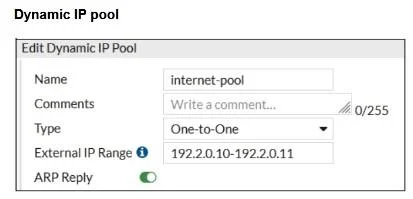
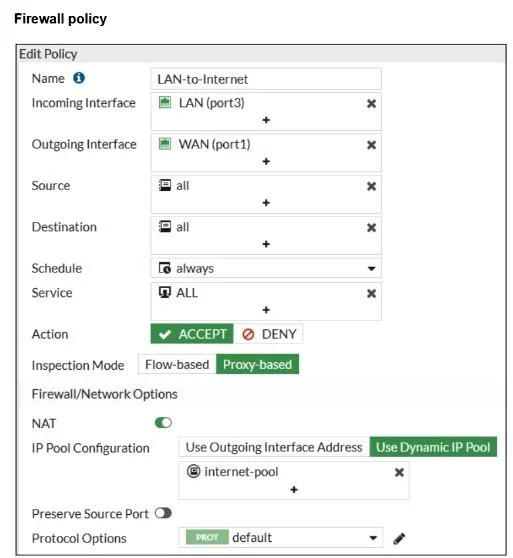
Refer to the exhibits. The exhibits show a diagram of a FortiGate device connected to the network, as well as the firewall policy and IP pool configuration on the FortiGate device. Two PCs, PC1 and…
The correct answer is A. In the IP pool configuration, set to overload. D. In the IP pool configuration, set endip to 192.2.0.12. With IP pool type set to One-to-One, only as many internal hosts as there are public IPs in the pool (192.2.0.10–192.2.0.11) can use NAT. Changing the type to overload allows all internal hosts (including PC3) to share the available public IPs, so PC3 can reach the internet…
Question
Refer to the exhibits. The exhibits show a diagram of a FortiGate device connected to the network, as well as the firewall policy and IP pool configuration on the FortiGate device. Two PCs, PC1 and PC2, are connected behind FortiGate and can access the internet successfully. However, when the administrator adds a third PC to the network (PC3), the PC cannot connect to the internet. Based on the information shown in the exhibit, which two configuration options can the administrator use to fix the connectivity issue for PC3? (Choose two.)
Exhibits
Options
- AIn the IP pool configuration, set to overload.
- BIn the firewall policy configuration, add 10.0.1.3 as an address object in the source field.
- CConfigure another firewall policy that matches only the address of PC3 as source, and then place
- DIn the IP pool configuration, set endip to 192.2.0.12.
How the community answered
(29 responses)- A72% (21)
- B7% (2)
- C21% (6)
Explanation
With IP pool type set to One-to-One, only as many internal hosts as there are public IPs in the pool (192.2.0.10–192.2.0.11) can use NAT. Changing the type to overload allows all internal hosts (including PC3) to share the available public IPs, so PC3 can reach the internet. Alternatively, keeping One-to-One but extending the pool to 192.2.0.10–192.2.0.12 adds another public IP, allowing a third internal host (PC3) to be mapped and gain internet access.
Topics
Community Discussion
No community discussion yet for this question.