
DP-300 · Question #54
Hotspot Question You have an Azure SQL database named db1. You need to retrieve the resource usage of db1 from the last week. How should you complete the statement? To answer, select the appropriate…
The correct answer is FROM: sys.resource_stats; start_time >: DATEADD. This question tests knowledge of the Azure SQL Database system catalog view used to monitor resource utilization metrics over time. You must construct a T-SQL query using the correct DMV and time filter to retrieve the past week's resource usage.
Question
Exhibit
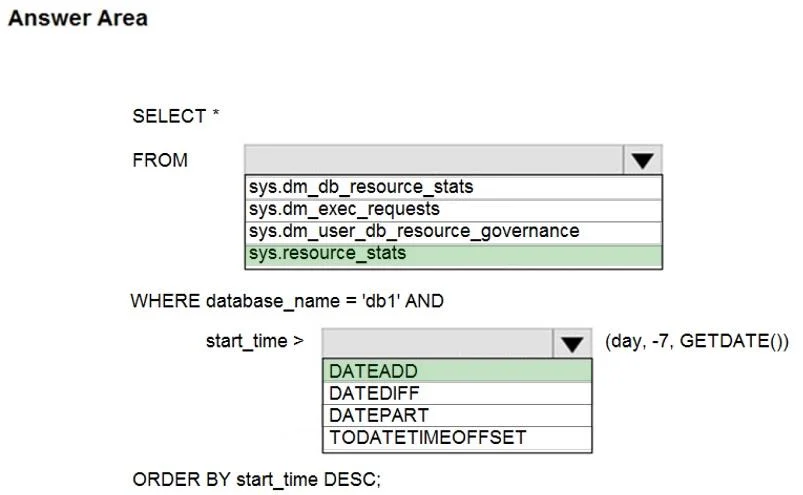
Answer Area
- FROMsys.resource_statssys.dm_db_resource_statssys.dm_exec_requestssys.dm_user_db_resource_governancesys.resource_stats
- start_time >DATEADDDATEADDDATEDIFFDATEPARTTODATETIMEOFFSET
Explanation
This question tests knowledge of the Azure SQL Database system catalog view used to monitor resource utilization metrics over time. You must construct a T-SQL query using the correct DMV and time filter to retrieve the past week's resource usage.
Approach. The correct statement uses the system dynamic management view (DMV) 'sys.dm_db_resource_stats' combined with a WHERE clause filtering 'end_time' to be greater than or equal to DATEADD(day, -7, GETUTCDATE()). The full query would look like: SELECT * FROM sys.dm_db_resource_stats WHERE end_time >= DATEADD(day, -7, GETUTCDATE()). 'sys.dm_db_resource_stats' records CPU, data I/O, log I/O, and memory consumption for Azure SQL Database, retaining data for the past 14 days in 15-second intervals. GETUTCDATE() is used (not GETDATE()) because Azure SQL stores resource stats in UTC time, and DATEADD(day, -7, ...) correctly calculates the 7-day lookback window.
Concept tested. Knowledge of Azure SQL Database system DMVs for resource monitoring, specifically 'sys.dm_db_resource_stats', and correct use of UTC-based date filtering with DATEADD and GETUTCDATE() to query historical performance metrics.
Topics
Community Discussion
No community discussion yet for this question.