
DP-300 · Question #53
Drag and Drop Question You are building an Azure virtual machine. You allocate two 1-TiB, P30 premium storage disks to the virtual machine. Each disk provides 5,000 IOPS. You plan to migrate an…
The correct answer is a storage pool; a virtual disk that uses the simple layout; a volume. Azure VM Storage Configuration - Explanation The Core Problem You have two 1-TiB P30 disks, each with 5,000 IOPS. The database needs 10,000 IOPS and 1.2 TiB of space. A single disk can't satisfy either requirement alone. The solution is to pool the disks together using Windows…
Question
Exhibits
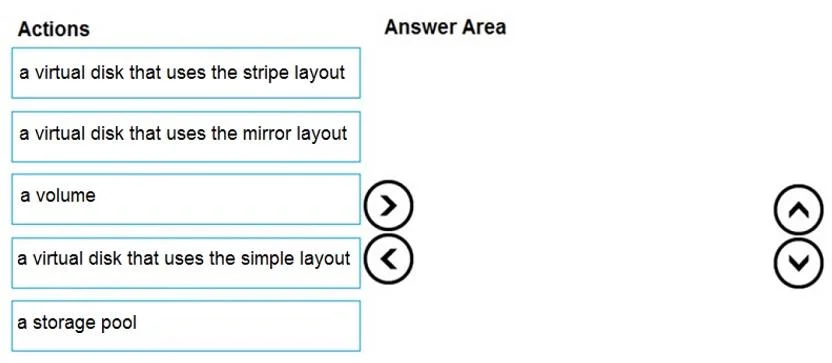
Answer Area
Drag items
Correct arrangement
- a storage pool
- a virtual disk that uses the simple layout
- a volume
Explanation
Azure VM Storage Configuration - Explanation
The Core Problem
You have two 1-TiB P30 disks, each with 5,000 IOPS. The database needs 10,000 IOPS and 1.2 TiB of space. A single disk can't satisfy either requirement alone. The solution is to pool the disks together using Windows Storage Spaces so their capacity and IOPS aggregate.
Correct Sequence & Why
1. Storage Pool
A storage pool is the foundation - it groups the two physical disks into a single manageable unit. You cannot create a virtual disk until you have a pool. Think of it as the container that abstracts the raw hardware.
You must always create the pool first. Nothing else can exist without it.
2. Virtual Disk using Simple layout
Within the pool, you create a virtual disk. The simple layout (equivalent to RAID-0 / striping across the underlying physical disks) is chosen here because:
- It stripes data across both disks, so reads/writes hit both disks simultaneously
- This aggregates IOPS: 5,000 + 5,000 = 10,000 IOPS - exactly what the database requires
- It aggregates capacity: 1 TiB + 1 TiB = 2 TiB - enough for the 1.2 TiB data file
The virtual disk must exist before you can create a volume on top of it.
3. Volume
A volume (NTFS or ReFS partition) is created on top of the virtual disk. This is what Windows and SQL Server actually see as a drive letter (e.g., D:\). SQL Server stores its data files here.
A volume is always last - it's the filesystem layer that applications interact with.
Common Mistakes & Misconceptions
| Mistake | Why it's wrong |
|---|---|
| Choosing stripe layout instead of simple | In Windows Storage Spaces terminology, "simple" IS the stripe layout. The option labeled "stripe" is a distractor - it does not exist as a separate Storage Spaces layout. The three actual layouts are: Simple, Mirror, and Parity. |
| Choosing mirror layout | Mirror duplicates data across disks for redundancy but does NOT increase IOPS or usable capacity beyond one disk. It would give only 5,000 IOPS and 1 TiB - insufficient for both requirements. |
| Skipping the storage pool | You cannot create a Storage Spaces virtual disk without a pool. The pool is mandatory and always first. |
| Putting volume before virtual disk | A volume needs a disk to live on. The virtual disk must be provisioned first. |
Summary
Physical Disks (2x P30)
    -> Storage Pool        (aggregate the hardware)
    -> Virtual Disk/Simple (stripe = combined IOPS + capacity)
    -> Volume              (filesystem SQL Server uses)
The key insight is that Simple = striped in Storage Spaces terminology, and striping is the only layout that satisfies both the IOPS (10,000) and capacity (>1.2 TiB) requirements simultaneously.
Topics
Community Discussion
No community discussion yet for this question.