
DP-300 · Question #175
Hotspot Question You have an on-premises Microsoft SQL Server 2019 instance that hosts a database named DB1. You plan to perform an online migration of DB1 to an Azure SQL managed instance by using…
This question tests knowledge of the correct backup command and storage location required for migrating an on-premises SQL Server database to Azure SQL Managed Instance using Azure Database Migration Service (DMS) in online mode.
Question
Exhibit
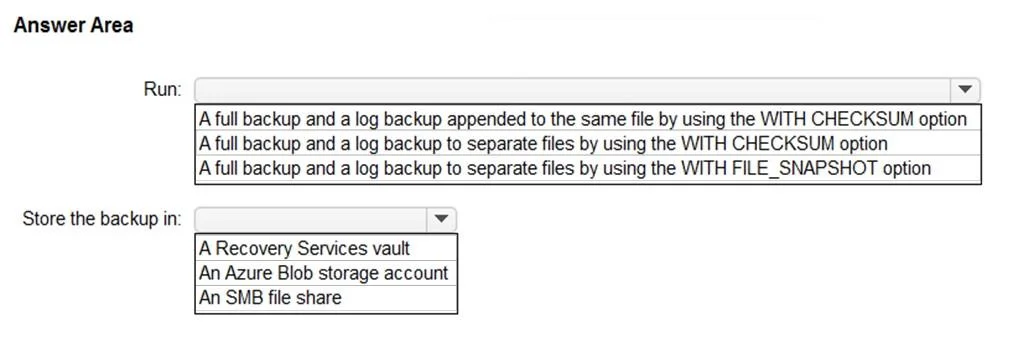
Answer Area
- Run:A full backup and a log backup appended to the same file by using the WITH CHECKSUM optionA full backup and a log backup to separate files by using the WITH CHECKSUM optionA full backup and a log backup to separate files by using the WITH FILE_SNAPSHOT option
- Store the backup in:A Recovery Services vaultAn Azure Blob storage accountAn SMB file share
Explanation
This question tests knowledge of the correct backup command and storage location required for migrating an on-premises SQL Server database to Azure SQL Managed Instance using Azure Database Migration Service (DMS) in online mode.
Approach. For the backup command, you should run a BACKUP DATABASE statement WITH CHECKSUM enabled (e.g., BACKUP DATABASE DB1 TO DISK = 'path' WITH CHECKSUM). The CHECKSUM option ensures backup integrity and is required by Azure Database Migration Service for validation during migration. For the storage location, the backup files must be stored in an Azure Blob Storage container (specifically an Azure Storage account/Blob container). Azure Database Migration Service reads the backup files directly from Azure Blob Storage to perform the online migration, so the backup must be accessible from Azure - storing it only on a local network share or local disk is insufficient unless a network share is also configured and accessible, but the primary supported method for online migrations to SQL MI is uploading backups to an Azure Blob Storage container. The DMS then restores the database from that container to the Azure SQL Managed Instance.
Concept tested. Azure Database Migration Service online migration requirements: specifically the need for a SQL Server backup taken WITH CHECKSUM and stored in Azure Blob Storage so that DMS can access and restore the database to Azure SQL Managed Instance.
Reference. https://learn.microsoft.com/en-us/azure/dms/tutorial-sql-server-managed-instance-online-ads
Topics
Community Discussion
No community discussion yet for this question.