
DP-300 · Question #48
Drag and Drop Question You have SQL Server 2019 on an Azure virtual machine that contains an SSISDB database. A recent failure causes the master database to be lost. You discover that all Microsoft…
The correct answer is Attach the SSISDB database; Turn on the TRUSTWORTHY property and the CLR property; Open the master key for the SSISDB database; Encrypt a copy of the master key by using the service master key. Recovering SSISDB After Master Database Loss Scenario: The master database was lost on a SQL Server 2019 instance hosting SSISDB. Since SSIS packages are stored in SSISDB, and SSISDB relies on encryption keys tied to the master database, restoring functionality requires…
Question
Exhibit
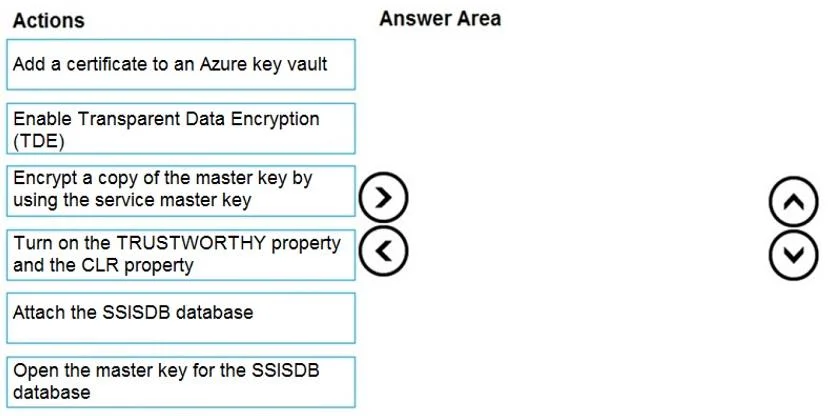
Answer Area
Drag items
Correct arrangement
- Attach the SSISDB database
- Turn on the TRUSTWORTHY property and the CLR property
- Open the master key for the SSISDB database
- Encrypt a copy of the master key by using the service master key
Explanation
Recovering SSISDB After Master Database Loss
Scenario: The master database was lost on a SQL Server 2019 instance hosting SSISDB. Since SSIS packages are stored in SSISDB, and SSISDB relies on encryption keys tied to the master database, restoring functionality requires re-establishing the database and its cryptographic chain.
Step-by-Step Explanation
1. Attach the SSISDB database
Why first: SSISDB is a user database stored separately from master. After master is rebuilt (via SQL Server recovery), SSISDB itself likely still exists on disk as .mdf/.ldf files. You must attach it to the new/rebuilt SQL Server instance before anything else - it's a prerequisite for all subsequent steps. You can't configure what doesn't yet exist in the instance.
2. Turn on the TRUSTWORTHY property and the CLR property
Why second: SSISDB requires two instance/database-level settings to function:
- TRUSTWORTHY ON - allows the database to access resources outside its own scope using the database owner's permissions. SSISDB's internal stored procedures rely on this.
- CLR enabled - SSISDB uses .NET CLR integration for internal catalog operations.
These must be enabled after attaching (so the database exists) but before opening the master key, because key operations depend on the database being in a trusted, CLR-capable state.
3. Open the master key for the SSISDB database
Why third: SSISDB uses a Database Master Key (DMK) to protect the symmetric keys that encrypt package data and sensitive parameters. When the master database was lost, the Service Master Key (SMK) - which normally auto-opens the DMK - is new/different. The DMK can't be auto-opened by the new SMK, so you must manually open it using the original password:
OPEN MASTER KEY DECRYPTION BY PASSWORD = 'your_original_password';
This temporarily decrypts the DMK so you can then re-encrypt it with the new SMK.
4. Encrypt a copy of the master key using the service master key
Why last: Once the DMK is open (step 3), you re-establish automatic decryption by encrypting the DMK with the new instance's Service Master Key:
ALTER MASTER KEY ADD ENCRYPTION BY SERVICE MASTER KEY;
This restores the normal auto-open behavior. Future SQL Server restarts will automatically open the SSISDB master key via the SMK, allowing SSIS packages to run without manual intervention.
Why the Other Options Are Wrong
| Item | Why excluded |
|---|---|
| Add a certificate to Azure Key Vault | Relevant to TDE/Azure scenarios, not SSISDB key recovery |
| Enable TDE | TDE is for encryption-at-rest; SSISDB recovery doesn't require enabling TDE |
| Change AD Admin | Active Directory changes are unrelated to this failure |
| Export/deploy ARM templates | Azure Resource Manager templates are for infrastructure deployment, not DB recovery |
| Deploy database schema/permissions | SSISDB schema already exists - you're attaching, not rebuilding from scratch |
| Add IP addresses to firewall | Network access issue, not relevant to this key/database recovery scenario |
Common Misconceptions
- "Just restore master" - Restoring master alone doesn't fix the DMK encryption mismatch; the cryptographic chain must be explicitly repaired.
- Skipping TRUSTWORTHY/CLR - SSISDB will attach successfully but catalog stored procedures will silently fail without these settings.
- Reversing steps 3 and 4 - You cannot encrypt with the SMK before opening the key; the DMK must be in an open (decrypted) state for
ALTER MASTER KEYto add new encryption.
Topics
Community Discussion
No community discussion yet for this question.