
DP-300 · Question #193
You have a new Azure subscription. You create an Azure SQL Database instance named DB1 on an Azure SQL Database server named Server1. You need to ensure that users can connect to DB1 in the event of…
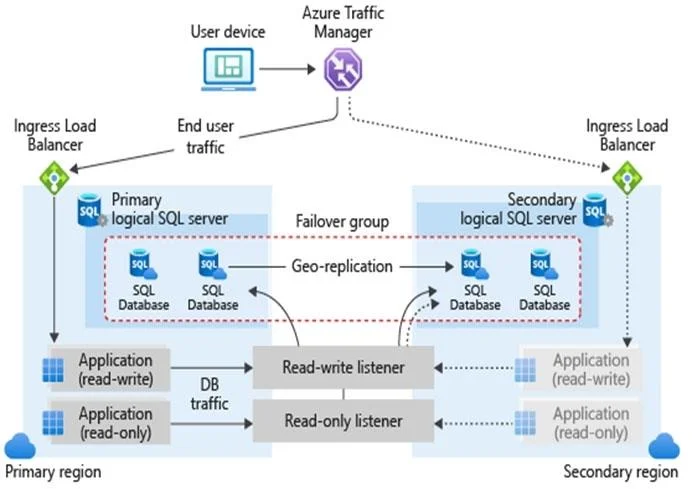
The correct answer is B. From the properties of Server1 add a failover group. C. Create a new Azure SQL Database server named Server2. B: The auto-failover groups feature allows you to manage the replication and failover of some or all databases on a logical server to another region. C: The auto-failover group must be configured on the primary server and will connect it to the secondary server in a different…
Question
Exhibit
Options
- AFrom the properties of DB1. configure geo-replication.
- BFrom the properties of Server1 add a failover group.
- CCreate a new Azure SQL Database server named Server2.
- DFrom the properties of Server1 configure retention for DB1
- ECreate a new Azure SQL Database instance named DB2.
How the community answered
(52 responses)- A4% (2)
- B77% (40)
- D6% (3)
- E13% (7)
Explanation
B: The auto-failover groups feature allows you to manage the replication and failover of some or all databases on a logical server to another region. C: The auto-failover group must be configured on the primary server and will connect it to the secondary server in a different Azure region. Not A: Geo-replication failovers require client applications to change their connection strings. https://docs.microsoft.com/en-us/azure/azure-sql/database/auto-failover-group- overview?tabs=azure-powershell#best-practices-for-sql-database https://docs.microsoft.com/en-us/azure/azure-sql/database/failover-group-add-single-database- tutorial?tabs=azure-portal
Topics
Community Discussion
No community discussion yet for this question.