
DP-300 · Question #182
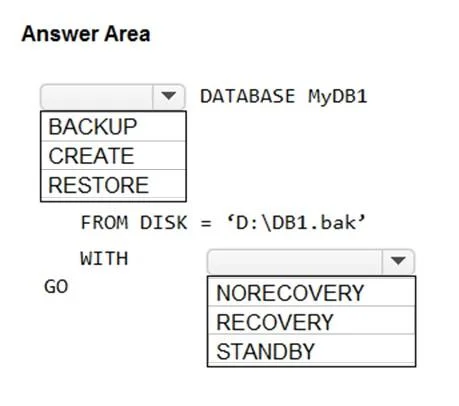
Hotspot Question You have two Azure virtual machines named VM1 and VM2 that run Windows Server 2019. VM1 and VM2 each host a default Microsoft SQL Server 2019 instance. VM1 contains a database named…
The correct answer is DATABASE MyDB1: RESTORE; WITH: NORECOVERY. This question tests knowledge of preparing a secondary database for an Always On Availability Group in SQL Server by restoring a database backup with the correct restore options on the secondary replica (VM2).
Question
Exhibit
Answer Area
- DATABASE MyDB1RESTOREBACKUPCREATERESTORE
- WITHNORECOVERYNORECOVERYRECOVERYSTANDBY
Explanation
This question tests knowledge of preparing a secondary database for an Always On Availability Group in SQL Server by restoring a database backup with the correct restore options on the secondary replica (VM2).
Approach. To prepare the secondary database on VM2, you must restore DB1 from the backup file (D:\DB1.bak) using RESTORE DATABASE with two critical options: WITH NORECOVERY and MOVE if needed. The key Transact-SQL statement is: RESTORE DATABASE DB1 FROM DISK = 'D:\DB1.bak' WITH NORECOVERY. The WITH NORECOVERY option is essential because it leaves the database in a restoring state, which is required for Always On Availability Groups - it allows subsequent transaction log backups to be applied and allows the database to join the availability group. Using WITH RECOVERY would bring the database online and prevent it from being added to an AG. Additionally, a transaction log backup must be taken on VM1 and restored on VM2 WITH NORECOVERY before joining the AG, unless using automatic seeding.
Concept tested. Preparing a secondary replica database for Always On Availability Groups requires restoring the full database backup (and any log backups) using WITH NORECOVERY, which leaves the database in a non-accessible restoring state so it can receive log shipping and eventually join the availability group.
Topics
Community Discussion
No community discussion yet for this question.