
DP-300 · Question #183
Drag and Drop Question You have an Azure Active Directory (Azure AD) tenant named contoso.com that contains a user named [email protected] and an Azure SQL managed instance named SQLMI1. You need to…
The correct answer is Grant SQLMI1 read access to Azure AD.; RUN CREATE LOGIN [email protected] FROM EXTERNAL PROVIDER on the master database.; RUN ALTER SERVER ROLE securityadmin ADD MEMBER [email protected]. To enable user1 to create Azure AD-based logins in SQL Managed Instance, you must first grant SQLMI1 read access to Azure AD (so it can authenticate against Azure AD), then create an external login for user1 using 'CREATE LOGIN FROM EXTERNAL PROVIDER' on the master database…
Question
Exhibit
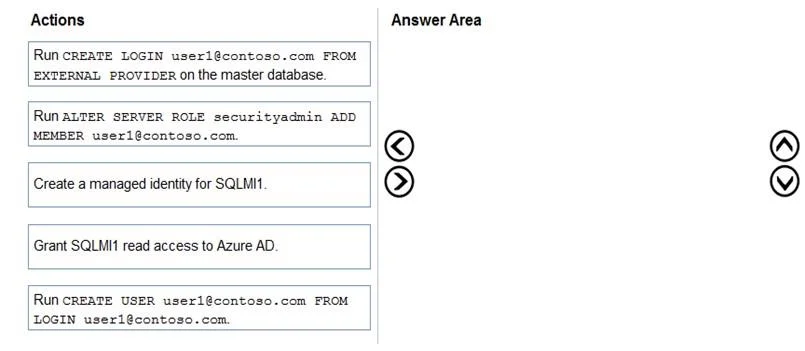
Answer Area
Drag items
Correct arrangement
- Grant SQLMI1 read access to Azure AD.
- RUN CREATE LOGIN [email protected] FROM EXTERNAL PROVIDER on the master database.
- RUN ALTER SERVER ROLE securityadmin ADD MEMBER [email protected].
Explanation
To enable user1 to create Azure AD-based logins in SQL Managed Instance, you must first grant SQLMI1 read access to Azure AD (so it can authenticate against Azure AD), then create an external login for user1 using 'CREATE LOGIN FROM EXTERNAL PROVIDER' on the master database, and finally grant user1 the securityadmin server role using 'ALTER SERVER ROLE securityadmin ADD MEMBER' so they have the permission to create other logins. This sequence is necessary because SQLMI1 needs Azure AD read permissions before any Azure AD authentication can work, the login must exist before it can be granted roles, and the securityadmin role specifically allows the creation and management of server-level logins.
Topics
Community Discussion
No community discussion yet for this question.