
DP-300 · Question #457
Hotspot Question You have an Azure SQL database named SQL1. You need to monitor the resource usage of SQL1 by using a dynamic management view. The solution must return the average memory usage and…
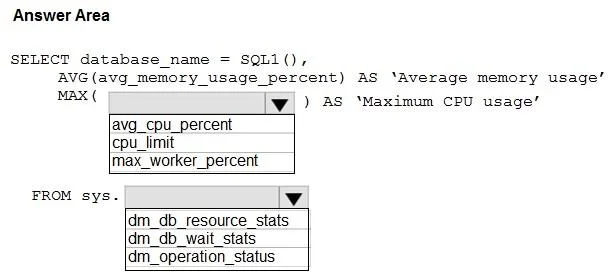
The correct answer is Select the column for Maximum CPU usage: avg_cpu_percent; Select the Dynamic Management View for resource monitoring: dm_db_resource_stats. This question tests knowledge of Azure SQL Database dynamic management views (DMVs), specifically sys.dm_db_resource_stats, which tracks resource consumption metrics including CPU and memory usage over time.
Question
Exhibit
Answer Area
- Select the column for Maximum CPU usageavg_cpu_percentavg_cpu_percentcpu_limitmax_worker_percent
- Select the Dynamic Management View for resource monitoringdm_db_resource_statsdm_db_resource_statsdm_db_wait_statsdm_operation_status
Explanation
This question tests knowledge of Azure SQL Database dynamic management views (DMVs), specifically sys.dm_db_resource_stats, which tracks resource consumption metrics including CPU and memory usage over time.
Approach. The correct DMV to use is sys.dm_db_resource_stats, which records resource usage snapshots every 15 seconds for Azure SQL Database. To get average memory usage, you use AVG(avg_memory_usage_percent), and to get peak CPU usage, you use MAX(avg_cpu_percent). The complete query would be: SELECT AVG(avg_memory_usage_percent) AS avg_memory, MAX(avg_cpu_percent) AS peak_cpu FROM sys.dm_db_resource_stats. The avg_memory_usage_percent column captures the average memory utilization, while avg_cpu_percent captures the CPU percentage - using MAX() on CPU gives the peak value, and AVG() on memory gives the average usage as required.
Concept tested. Azure SQL Database Dynamic Management Views (DMVs) - specifically sys.dm_db_resource_stats for monitoring resource utilization metrics such as CPU and memory, and applying appropriate aggregate functions (AVG for average memory, MAX for peak CPU) to derive meaningful performance insights.
Topics
Community Discussion
No community discussion yet for this question.