
DP-300 · Question #456
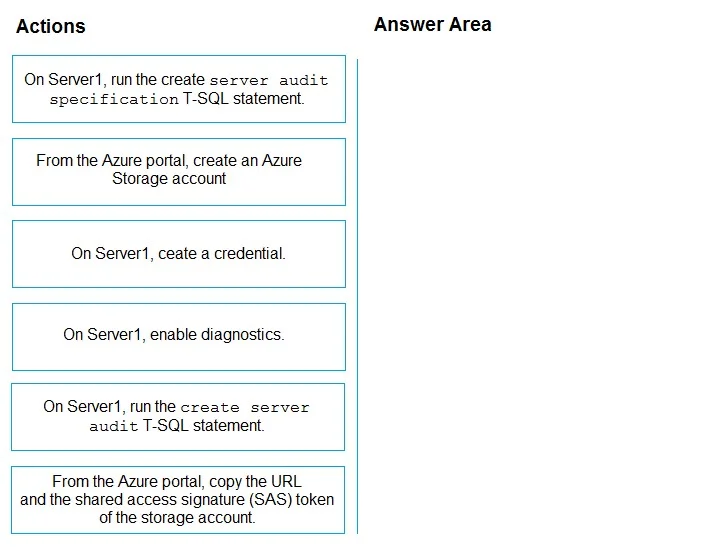
Drag and Drop Question You have an Azure subscription that contains an Azure SQL managed instance named Server1. You need to enable auditing for Server1. The solution must minimize administrative…
The correct answer is From the Azure portal, create an Azure Storage account; From the Azure portal, copy the URL and the shared access signature (SAS) token of the storage account.; On Server1, ceate a credential.; On Server1, run the create server audit T-SQL statement. To enable auditing on an Azure SQL Managed Instance to a Storage Account, you must first create the Storage Account in the Azure portal, then copy its URL and SAS token to use as credentials. Next, you create a credential on Server1 using that SAS token, then create the server…
Question
Exhibit
Answer Area
Drag items
Correct arrangement
- From the Azure portal, create an Azure Storage account
- From the Azure portal, copy the URL and the shared access signature (SAS) token of the storage account.
- On Server1, ceate a credential.
- On Server1, run the create server audit T-SQL statement.
Explanation
To enable auditing on an Azure SQL Managed Instance to a Storage Account, you must first create the Storage Account in the Azure portal, then copy its URL and SAS token to use as credentials. Next, you create a credential on Server1 using that SAS token, then create the server audit using T-SQL pointing to the storage URL, and finally create the server audit specification to define what events to audit. This sequence ensures the storage destination exists and is authenticated before the audit objects are created on the instance. Azure SQL Managed Instance does not support the simple portal-based auditing toggle available for Azure SQL Database, requiring this T-SQL approach with a credential.
Topics
Community Discussion
No community discussion yet for this question.