
DP-300 · Question #437
Hotspot Question You have an Azure SQL database named DB1 that is hosted on a SQL server named Server1. You need to restore DB1. The solution must only restore data that is older than 36 hours. How…
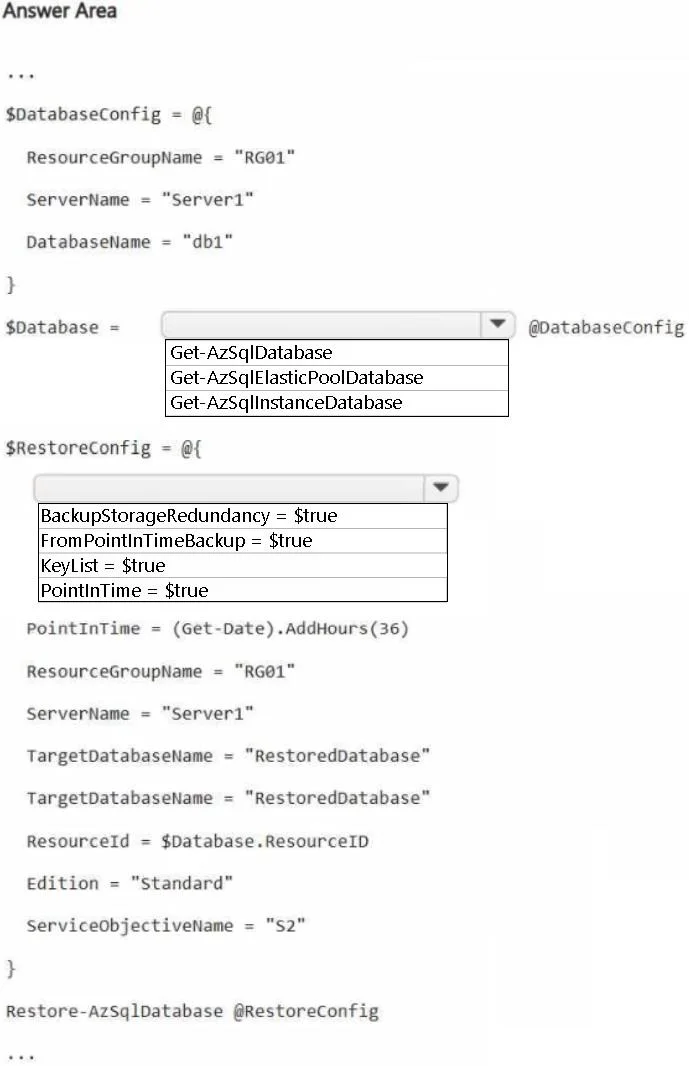
The correct answer is Select cmdlet for $Database: Get-AzSqlDatabase; Select parameter for $RestoreConfig: PointInTime = $true. Azure SQL Database Point-in-Time Restore - Hotspot Explanation --- Dropdown 1: $Database cmdlet -> Get-AzSqlDatabase Why Get-AzSqlDatabase is correct: This cmdlet retrieves a database object from a standalone Azure SQL Database (single database or elastic pool member on a…
Question
Exhibit
Answer Area
- Select cmdlet for $DatabaseGet-AzSqlDatabaseGet-AzSqlDatabaseGet-AzSqlElasticPoolDatabaseGet-AzSqlInstanceDatabase
- Select parameter for $RestoreConfigPointInTime = $trueBackupStorageRedundancy = $trueFromPointInTimeBackup = $trueKeyList = $truePointInTime = $true
Explanation
Azure SQL Database Point-in-Time Restore - Hotspot Explanation
Dropdown 1: $Database cmdlet -> Get-AzSqlDatabase
Why Get-AzSqlDatabase is correct:
This cmdlet retrieves a database object from a standalone Azure SQL Database (single database or elastic pool member on a logical server). The scenario specifies DB1 is on Server1 - a standard SQL Server (logical server), so this is the correct scope.
Why the alternatives are wrong:
| Option | Why Wrong |
|---|---|
Get-AzSqlElasticPoolDatabase | Targets databases specifically inside an elastic pool. The question doesn't mention an elastic pool. |
Get-AzSqlInstanceDatabase | Targets Azure SQL Managed Instance databases, not standalone Azure SQL Database servers. Different product entirely. |
Concept: Azure SQL has three deployment models - single database, elastic pool, and managed instance - each with separate cmdlets.
Dropdown 2: $RestoreConfig parameter -> PointInTime = $true
Why PointInTime = $true is correct:
The requirement is to restore data older than 36 hours. This is a Point-in-Time Restore (PITR) operation, which restores the database to a specific timestamp in the past. Azure SQL retains automated backups for 7-35 days, so targeting a point 36+ hours ago is exactly what PITR handles via Restore-AzSqlDatabase -FromPointInTimeBackup with -PointInTime.
Why the alternatives are wrong:
| Option | Why Wrong |
|---|---|
BackupStorageRedundancy = $true | This configures where backups are stored (LRS/ZRS/GRS) - not how to restore them. Not a valid restore parameter. |
FromPointInTimeBackup = $true | This is the cmdlet switch on Restore-AzSqlDatabase, not a property of the restore config object. It's used elsewhere in the script, not in this config block. |
KeyList = $true | Unrelated - pertains to TDE (Transparent Data Encryption) key management, not restore operations. |
Concept: PITR works by replaying transaction logs from a full backup to the exact timestamp you specify. The PointInTime property sets that target timestamp in the restore configuration object.
Topics
Community Discussion
No community discussion yet for this question.