
DP-300 · Question #418
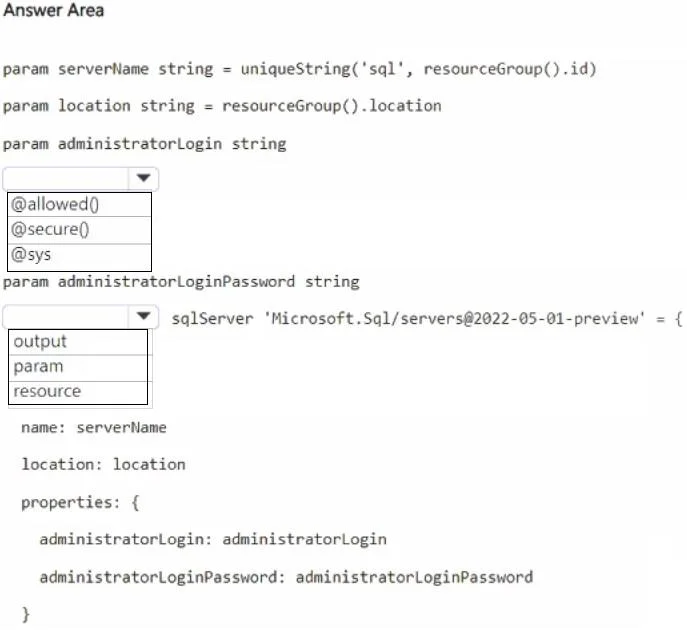
Hotspot Question You have an Azure subscription. You need to provision a logical server for Azure SQL Database by using a Bicep template. How should you complete the template? To answer, select the…
The correct answer is Decorator for param administratorLogin string: @secure(); Type declaration for sqlServer 'Microsoft.Sql/servers@2022-05-01-preview': resource. The question requires selecting the correct Bicep decorator for a sensitive parameter and the correct keyword for defining an Azure resource.
Question
Exhibit
Answer Area
- Decorator for param administratorLogin string@secure()@allowed()@secure()@sys
- Type declaration for sqlServer 'Microsoft.Sql/servers@2022-05-01-preview'resourceoutputparamresource
Explanation
The question requires selecting the correct Bicep decorator for a sensitive parameter and the correct keyword for defining an Azure resource.
Approach. 1. For the first dropdown, next to param administratorLogin string, select @secure(). The administratorLogin is a sensitive credential. The @secure() decorator marks a parameter's value as sensitive, preventing it from being logged or displayed in plain text in deployment outputs, which is a best practice for security when dealing with credentials or other confidential information. Although administratorLoginPassword would also be secure, administratorLogin itself, when paired with a password, is part of a sensitive credential set.
2. For the second dropdown, at the beginning of the sqlServer 'Microsoft.Sql/servers@2022-05-01-preview' = { definition, select resource. In Bicep, the resource keyword is used to declare and define an Azure resource. The line shown is clearly defining an instance of an Azure SQL Server, which is an Azure resource, hence resource is the appropriate keyword.
Common mistakes.
- common_mistake. For the first dropdown, selecting
@allowed()is incorrect because it's used to specify a list of acceptable values for a parameter, and typically for a login, a static list isn't applicable, or the syntax@allowed()is incomplete for its proper use.@sysis not a valid Bicep decorator. For the second dropdown, selectingoutputis incorrect because it's used to define values returned from a Bicep deployment, not to define a resource. Selectingparamis incorrect because it's used to declare input parameters for the template, not to define an Azure resource itself.
Concept tested. This question tests the understanding of fundamental Bicep syntax, specifically parameter decorators for handling sensitive information (@secure()) and the keyword for defining Azure resources (resource). It also touches on best practices for secure configuration in Infrastructure as Code.
Reference. https://learn.microsoft.com/en-us/azure/azure-resource-manager/bicep/parameters#secure-parameters, https://learn.microsoft.com/en-us/azure/azure-resource-manager/bicep/resources
Topics
Community Discussion
No community discussion yet for this question.