
DP-300 · Question #416
Drag and Drop Question You have an Azure subscription that contains a SQL Server on Azure virtual Machines instance named SQLVM1. You need to ensure that SQL Server Agent jobs on SQLVM1 can run…
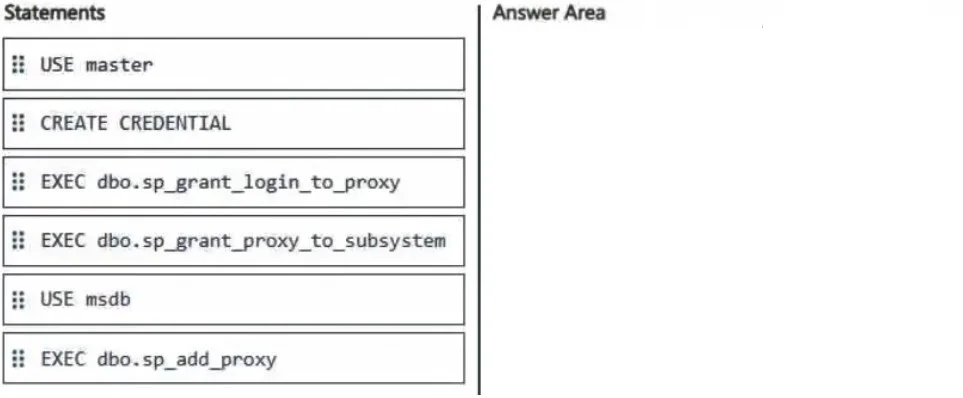
The correct answer is USE msdb; CREATE CREDENTIAL; EXEC dbo.sp_add_proxy; EXEC dbo.sp_grant_login_to_proxy; EXEC dbo.sp_grant_proxy_to_subsystem. To enable SQL Server Agent jobs to run operating system (CmdExec) commands, you must create a proxy account in the msdb database, which is the system database that SQL Server Agent uses. The correct sequence is: switch to msdb context, create a credential (which stores the…
Question
Exhibit
Answer Area
Drag items
Correct arrangement
- USE msdb
- CREATE CREDENTIAL
- EXEC dbo.sp_add_proxy
- EXEC dbo.sp_grant_login_to_proxy
- EXEC dbo.sp_grant_proxy_to_subsystem
Explanation
To enable SQL Server Agent jobs to run operating system (CmdExec) commands, you must create a proxy account in the msdb database, which is the system database that SQL Server Agent uses. The correct sequence is: switch to msdb context, create a credential (which stores the Windows account credentials the proxy will run as), create the proxy linked to that credential using sp_add_proxy, grant a login access to use the proxy with sp_grant_login_to_proxy, and finally grant the proxy permission to the CmdExec subsystem using sp_grant_proxy_to_subsystem. This sequence is mandatory because each step depends on the previous one - the proxy cannot exist without a credential, and subsystem/login grants cannot be made without an existing proxy.
Topics
Community Discussion
No community discussion yet for this question.