
DP-300 · Question #413
Hotspot Question You have an Azure subscription. You plan to provision a logical SQL server for Azure SQL Database by using a Bicep template. You need to configure the resource section of the…
The correct answer is parent:: serverName; connectionType:: 'Redirect'. This question tests knowledge of configuring Azure SQL logical server Bicep templates, specifically the connection policy and minimal TLS version settings that maximize network performance regardless of connection origin.
Question
Exhibit
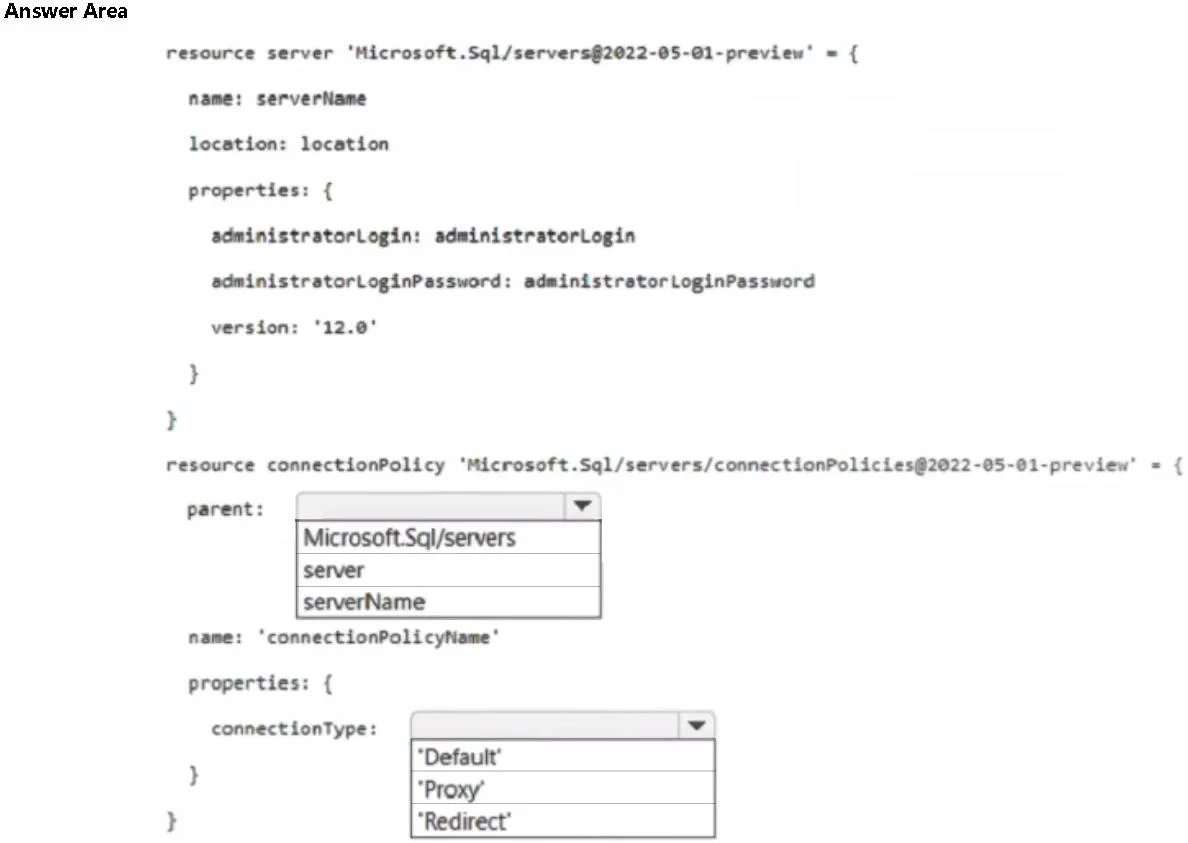
Answer Area
- parent:serverNameMicrosoft.Sql/serversserverserverName
- connectionType:'Redirect''Default''Proxy''Redirect'
Explanation
This question tests knowledge of configuring Azure SQL logical server Bicep templates, specifically the connection policy and minimal TLS version settings that maximize network performance regardless of connection origin.
Approach. To maximize performance for network connections regardless of origin (inside or outside Azure), you should set the 'connectionType' property to 'Redirect' within the 'Microsoft.Sql/servers/connectionPolicies' resource. The Redirect policy allows clients to establish connections directly to the node hosting the database, reducing latency by bypassing the gateway after the initial connection. The resource type should be 'Microsoft.Sql/servers/connectionPolicies' with name 'Default', and the connectionType property set to 'Redirect' - this ensures both Azure-internal and external clients benefit from the lowest-latency direct connection path. The Proxy policy routes all traffic through the gateway (higher latency), while Default uses Redirect for Azure-originated connections and Proxy for external ones, so only 'Redirect' universally maximizes performance for all connection origins.
Concept tested. Azure SQL Database connection policies in Bicep templates - specifically the difference between Proxy, Redirect, and Default connection types, and how the 'Microsoft.Sql/servers/connectionPolicies' resource is configured to optimize network performance for all clients regardless of whether they originate from within or outside Azure.
Topics
Community Discussion
No community discussion yet for this question.