
DP-300 · Question #412
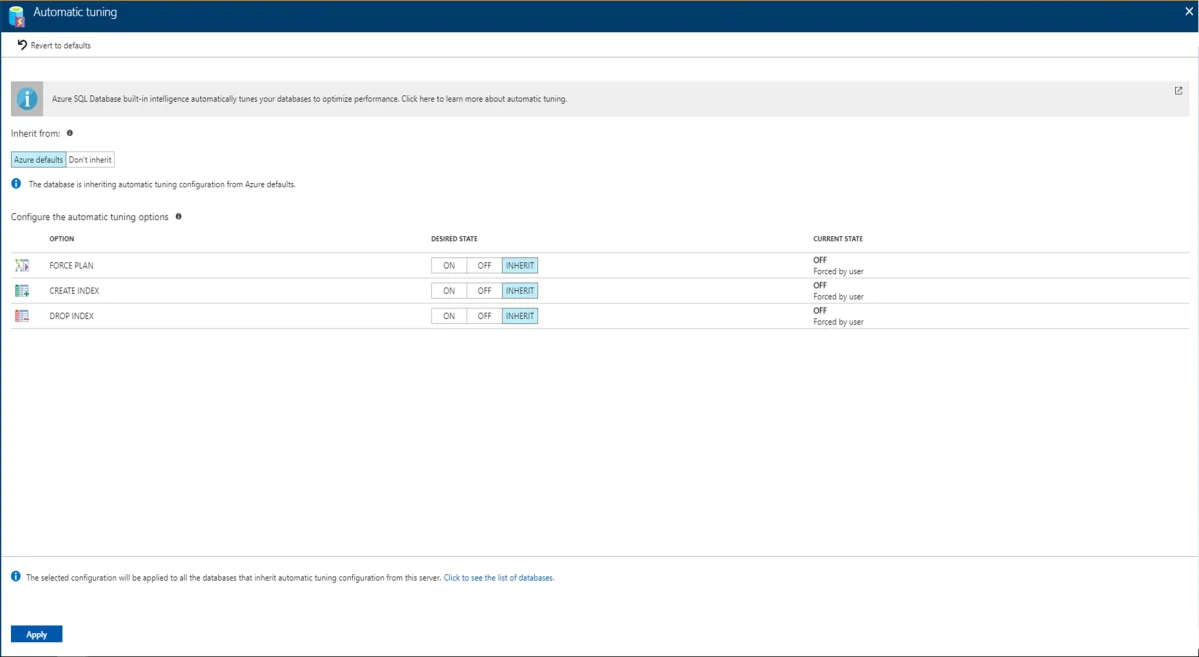
SIMULATION You need to ensure that indexes are created automatically for all the databases on sql12345678. You may need to use SQL Server Management Studio and the Azure portal. Answer: Automatic…
Enabling CREATE_INDEX under Automatic Tuning at the server level in the Azure portal is the correct approach because Azure SQL Database's automatic tuning feature monitors query workloads and automatically creates indexes that improve performance across all databases inheriting…
Question
Exhibit
Explanation
Enabling CREATE_INDEX under Automatic Tuning at the server level in the Azure portal is the correct approach because Azure SQL Database's automatic tuning feature monitors query workloads and automatically creates indexes that improve performance across all databases inheriting the server-level configuration. By navigating to sql12345678 in the Azure portal, selecting Automatic Tuning, enabling CREATE_INDEX, and clicking Apply, the setting cascades down to all databases on that server that are configured to inherit from the server defaults. This is the designated Azure-native mechanism for automating index management without manual intervention per database.
Topics
Community Discussion
No community discussion yet for this question.