
Microsoft
DP-300 · Question #373
SIMULATION You need to configure a monthly backup of db2. The monthly backups must be retained for five years, and then deleted. To complete this task, sign in to the virtual machine. You may need…
To configure monthly backups with a five-year retention policy for an Azure SQL Database, the long-term retention (LTR) policy within the automated backup settings must be utilized.
Submitted by ashley.k· Mar 6, 2026Plan and implement data platform resources
Question
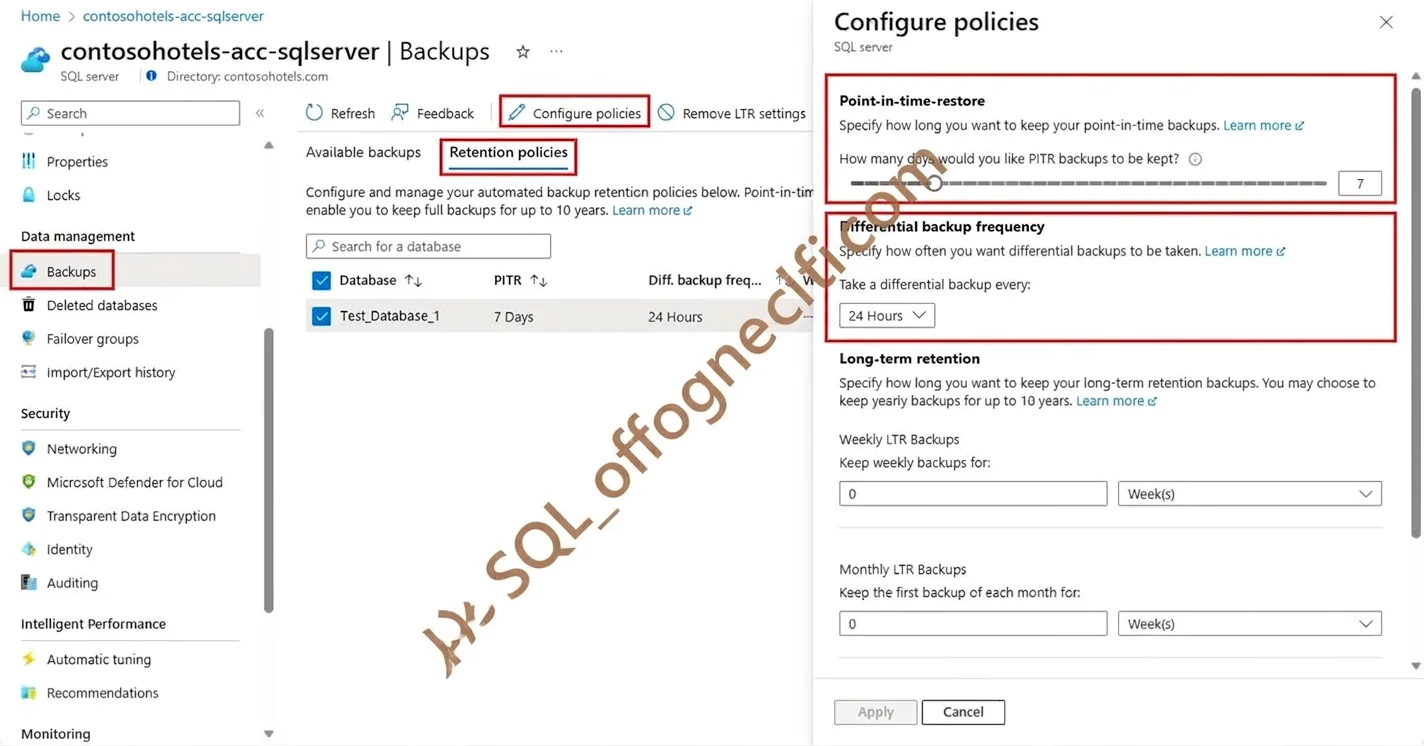
SIMULATION You need to configure a monthly backup of db2. The monthly backups must be retained for five years, and then deleted. To complete this task, sign in to the virtual machine. You may need to use SQL Server Management Studio and the Azure portal. Answer: Change automated backup settings for Azure SQL Database You can modify automated backup settings for Azure SQL Database, such as the short-term retention policy and the backup storage redundancy option that's used for backups. To change differential backup frequency, select 12 Hours or 24 hours from the drop-down menu under Differential backup frequency. Step 1: Go to the logical server in Azure with the databases whose retention period you want to change. Step 2: Select Backups on the left pane, and then select the Retention policies tab. Step 3: Select the databases for which you want to change the PITR backup retention. [Select db2] Step 4: Select Configure policies from the action bar. Step 5: To change the retention period for point-in-time restore backups, use the slider under Point-in-time restore. [Skip] Step 6: To change the PITR (point-in-time recovery) backup retention period or the differential backup frequency for active databases by using the Azure portal: [Skip] Step 7: In Long-term retention, Monthly LTR Bakcups, Set Keep the first backup of each month for: 5 Years Question: The monthly backups must be retained for five years, and then deleted. Reference: https://learn.microsoft.com/en-us/azure/azure-sql/database/automated-backups-change-settings
Exhibit
Explanation
To configure monthly backups with a five-year retention policy for an Azure SQL Database, the long-term retention (LTR) policy within the automated backup settings must be utilized.
Concept tested. Azure SQL Database long-term backup retention
Community Discussion
No community discussion yet for this question.