
DP-300 · Question #328
Hotspot Question You have an Azure subscription that contains a storage account named databasebackups. You have an Azure SQL managed instance named DB1. You need to back up DB1 to databasebackups…
The correct answer is WITH IDENTITY =: 'SHARED ACCESS SIGNATURE'. This question tests knowledge of backing up an Azure SQL Managed Instance database to an Azure Blob Storage account using T-SQL BACKUP DATABASE command with a SAS credential.
Question
Exhibit
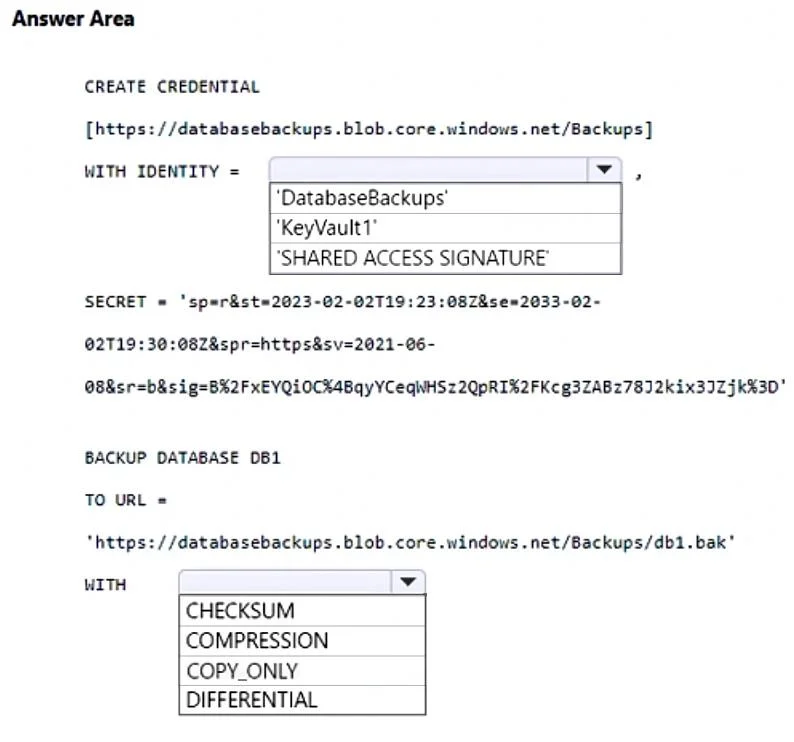
Answer Area
- WITH IDENTITY ='SHARED ACCESS SIGNATURE''DatabaseBackups''KeyVault1''SHARED ACCESS SIGNATURE'
- WITHCHECKSUMCOMPRESSIONCOPY_ONLYDIFFERENTIAL
Explanation
This question tests knowledge of backing up an Azure SQL Managed Instance database to an Azure Blob Storage account using T-SQL BACKUP DATABASE command with a SAS credential.
Approach. To back up an Azure SQL Managed Instance to Azure Blob Storage, you must first create a credential using CREATE CREDENTIAL with the storage account URL and a SAS token as the SECRET. Then you execute BACKUP DATABASE [DB1] TO URL = 'https://databasebackups.blob.core.windows.net/container/backup.bak' WITH CREDENTIAL = 'credential_name'. The URL format uses the storage account name (databasebackups) followed by .blob.core.windows.net, the container name, and the backup file name. The credential must be created beforehand using the SAS token generated for the storage container, allowing the managed instance to authenticate and write to the blob storage.
Concept tested. Backing up Azure SQL Managed Instance databases to Azure Blob Storage using T-SQL BACKUP DATABASE TO URL command with SAS-based credentials. This involves: (1) CREATE CREDENTIAL using SHARED ACCESS SIGNATURE identity and SAS token as SECRET, (2) BACKUP DATABASE using TO URL pointing to the blob storage endpoint of the 'databasebackups' storage account.
Topics
Community Discussion
No community discussion yet for this question.